SimpleFill Black Friday 2026 deal
SimpleFill has a confirmed Black Friday 2026 deal: 25% off SimpleFill Standard and Pro with code LAUNCH, Pro $44.25 instead of $59, one-time. Nov 10 to Dec 7, 2026. Confirmed to us directly by the maker, listing last checked Nov 13, 2026. Black Friday 2026 is Nov 27 and Cyber Monday is Nov 30.
| Status | Confirmed for Black Friday 2026 |
|---|---|
| Discount | 25% off |
| Code | LAUNCH |
| Ends | Dec 7, 2026 |
| Last checked | Nov 13, 2026 |
See also: Black Friday 2026 Productivity deals
A browser extension for text expansion, AI actions and form filling in Chrome, Firefox and Edge.
Deal status
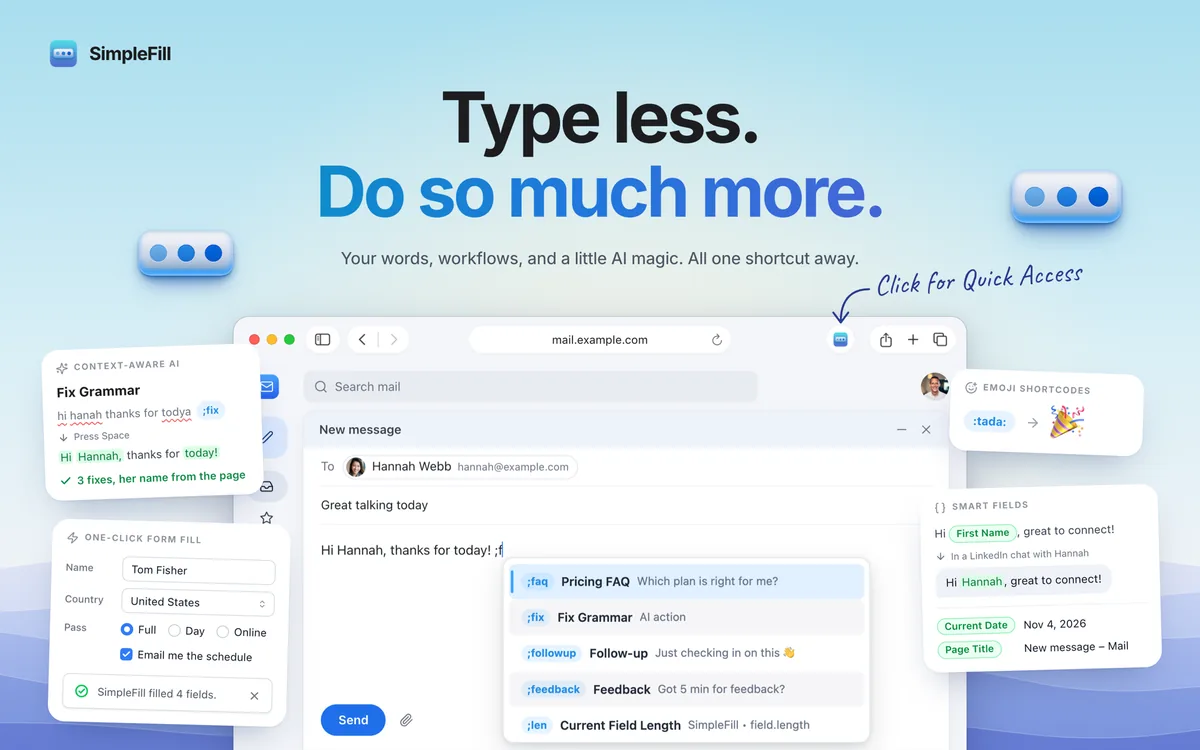
Live deal · confirmed by the maker 25% off SimpleFill Standard and Pro with code LAUNCH, at checkout on simplefill.app: Standard $21.75 instead of $29, Pro $44.25 instead of $59, one-time. The code does not apply to the Safari version on the Mac App Store. Nov 10 to Dec 7, 2026 maker’s announcementWhat SimpleFill looks likeImage from SimpleFill's App Store
Get deal alerts by email
We send a weekly email in November with the Black Friday 2026 deals makers have confirmed. Free, unsubscribe anytime.
What does it do?
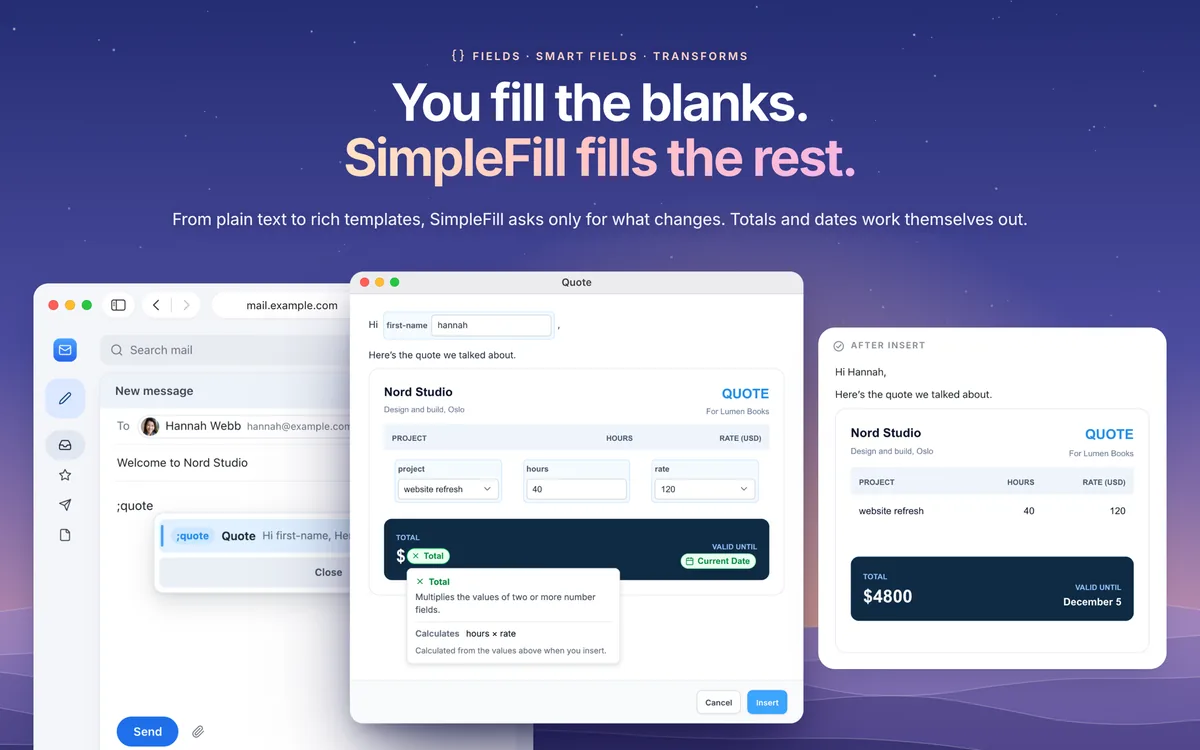
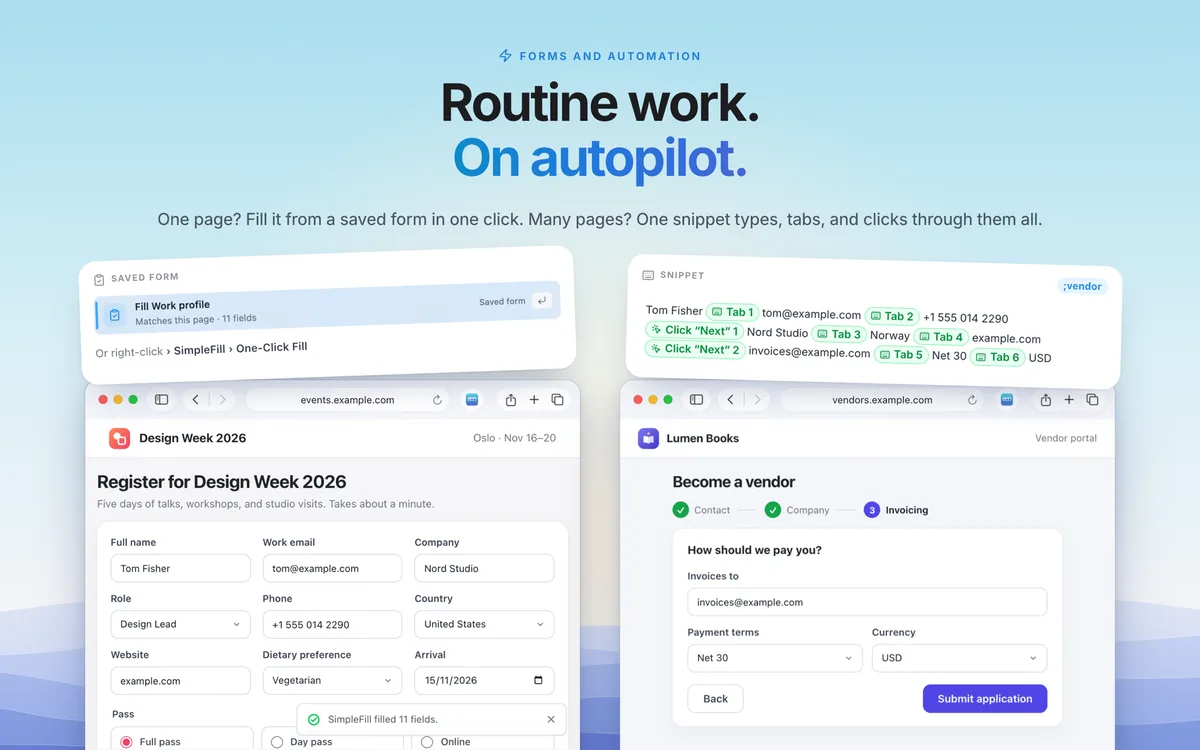
In the browser, SimpleFill expands short shortcuts into formatted text, can fill a whole web form in one click, and can run AI on the field you are in. Snippets can include Fields you complete at insert time, Smart Fields that read the page (title, URL, date, or a name on a supported site), and Transforms that reshape those values. Chrome, Firefox, Edge and Safari are supported, including editors such as Gmail, Google Docs, HubSpot and LinkedIn, and items you save stay in the browser.
Who is it for?
Anyone who types the same replies, signatures, invoices or form answers in the browser and wants a local expander with optional AI, without another monthly fee for the core plans.
When would you use it?
- Expand a welcome email: Type a shortcut such as ;welcome and fill in first name, plan and a kickoff date, while today’s date and a slugified company name drop in automatically.
- Fix a sentence in place: Select a draft in Gmail, run an AI action such as Fix Grammar or Generate Reply, and preview the result before inserting it, using your own API key or a model on your computer.
- Fill a registration once, then again: Save a work-profile form and reuse it on the next event page, or have a snippet type, tab and click through a multi-step vendor application.
- Search instead of memorizing: Press Command-Shift-Space on a Mac, or Control-Shift-Space on Windows or Linux, to find any snippet, form or action without remembering its shortcut.
Why pay for it?
Built-in browser autofill is aimed at addresses and passwords, not formatted messages or multi-step forms. SimpleFill keeps the rich expander, form fill and AI actions in the page you are already writing, and the Free, Standard and Pro plans all include the same features, differing only in how many items you can store.
What should you know?
- The free plan allows 5 items each for snippets, folders, blocks, fields and forms, plus 10 built-in AI actions. Standard, at $29 paid once, raises those caps to 50. Pro, at $59 paid once, removes the caps. All three plans include the same features.
- Code LAUNCH takes 25% off Standard and Pro at checkout on simplefill.app from November 10 to December 7, 2026, which is $21.75 and $44.25. That discount is for the site checkout only, not the Safari build purchased through Apple.
- A Chrome, Firefox or Edge license can be used on up to three browsers at once, on any of those brands. The Safari edition is a separate purchase through Apple and is not covered by that license. There is no simple in-app path to a higher plan, so a larger cap means buying a new license, though the maker says they can work something out if you write.
- Items you save live in the browser and are not kept on SimpleFill’s servers, unless you later use the optional Team plans or SimpleFill AI (both still coming) or you send text to a cloud AI provider you configured. Cloud API usage and paid marketplace templates are billed separately. Direct purchases through Polar can be refunded in full at any time.
A look inside SimpleFill
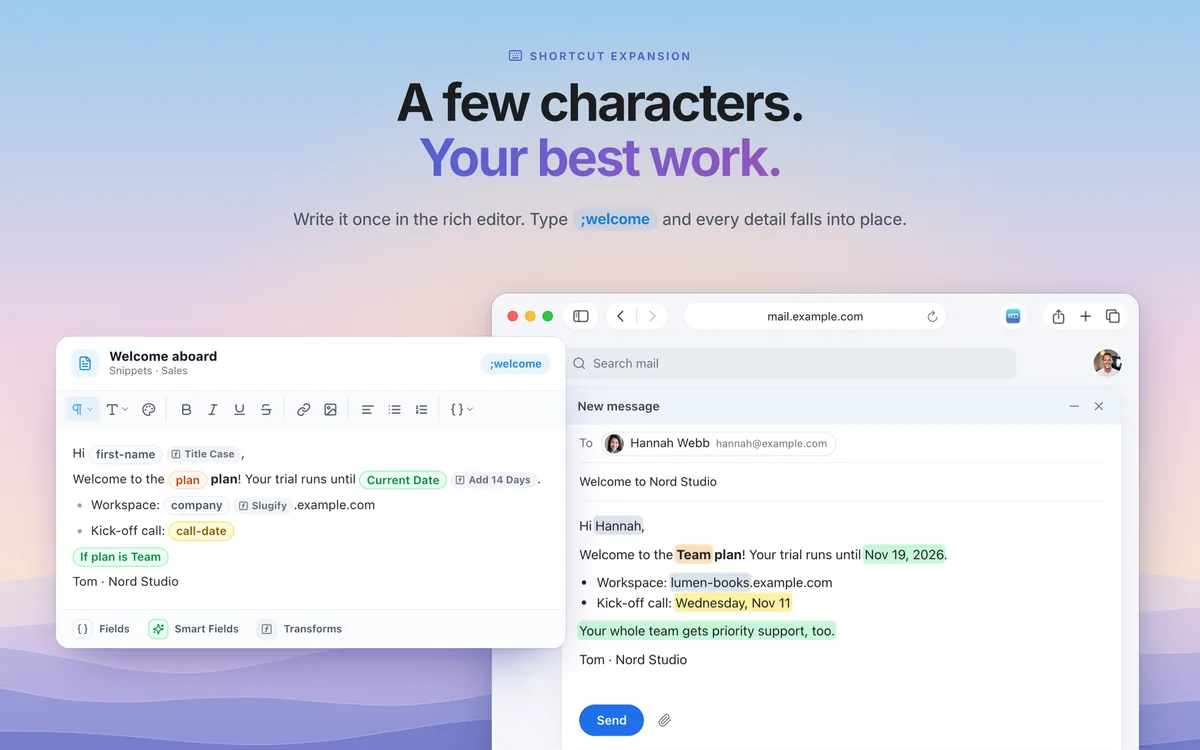
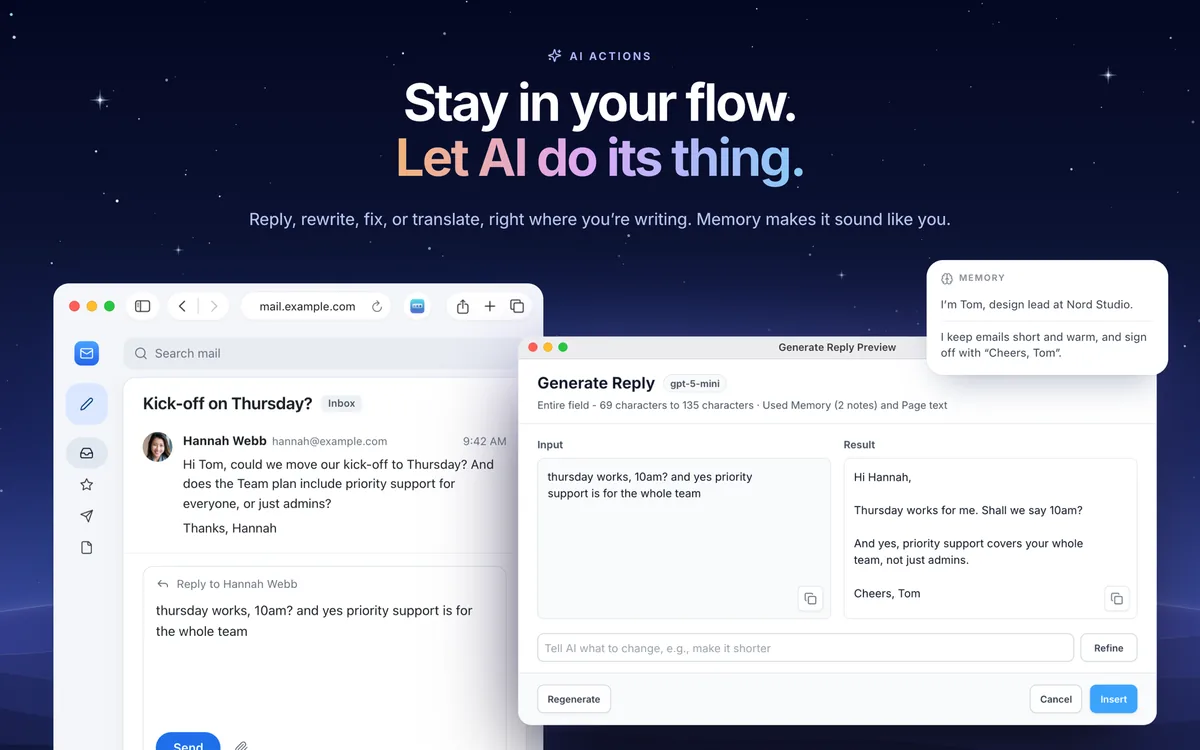
Images from the App Store listing.
Prices and codes change. Last year's codes may no longer work — always confirm on the maker's site. Are you the maker? Send us your 2026 deal — listing is free.
Featured in: Snippety Black Friday 2026 deal + 5 more
Similar deals
- Capture - Quick Notes — Catch a thought on your phone and later export it into the writing or task app you…
- Accountit — Log income, expenses, and transfers on Apple devices with budgets and receipts.
- Nihongo – Japanese Dictionary — Look up Japanese offline, scan text from a photo, and turn what you find into flashcards.
- Teletable — Live football scores, tables, and other sports stats on a Mac, shown in a retro…
- Pretty Progress - Countdown — Put beautiful countdown and progress widgets on your phone for every goal, trip and…
- Doneit — Sort tasks with lists or boards, and unlock a timeline when projects grow.
SimpleFill deal history
| Year | Offer | Dates | Source |
|---|---|---|---|
| 2026 | 25% off SimpleFill Standard and Pro with code LAUNCH, at checkout on simplefill.app: Standard $21.75 instead of $29, Pro $44.25 instead of $59, one-time. The code does not apply to the Safari version on the Mac App Store. Nov 10 to Dec 7, 2026 | Nov 10, 2026 – Dec 7, 2026 | Confirmed by the maker (announcement) |
Similar apps to SimpleFill
- DuoTyping — An AI writing companion that rewrites or checks text where you type, on the Mac, Windows, and in Chrome or Edge. It can use the DuoTyping Engine or your own OpenAI, Anthropic, Google, or custom keys; the text you send goes to that AI service. Live deal 50% off the first Pro payment with code BFCM2026 (monthly $9.90 → $4.95, yearly $89.90 → $44.95). Through December 13, 2026.
- ActionClip — A Mac utility that runs iPhone-style text actions on selected text, with a free tier of 30 actions a day and paid lifetime plans for unlimited use on 1, 3, or 10 Macs. Live deal Black Friday lifetime plans: Individual $9 (1 Mac), Family $15 (up to 3 Macs), Team $29 (up to 10 Macs), through November 29, 2026, 23:59 UTC. Pay once, no subscription. A free download covers 30 actions a day.
- SupaSidebar — Arc-style sidebar for Safari, Chrome and other browsers with spaces, files and folders. Live deal Lifetime licence for $55.30 with code SIDEBARBF30 (30% off), while the Black Friday offer lasts; no end date shown
- Dropzone 5 — Drop files onto Mac actions that move, upload, or share them without opening a pile of apps. Live deal 40% off the Dropzone 5 Pro Lifetime license with code BLACKFRIDAY26, Nov 23 to Dec 6, 2026
- Alter — Mac AI system that captures app context and turns voice or text into actions. Awaiting this year's deal; 2025 offer (unconfirmed): 70% off Exclusive Lifetime Bundle With 40,000 AI requests included and 2,000+ to
- SwiftBiu — Select text or files on Mac and run actions, OCR, AI rewrite and plugins from a toolbar. Awaiting this year's deal; 2025 offer (unconfirmed): 50% OFF Pro Lifetime only $ 4.99 between Nov 21 - Dec 26
More in Productivity (245 apps) · More in AI (100 apps) · When Mac app Black Friday sales start
FAQ
Is SimpleFill on sale for Black Friday 2026?
Yes. The maker has confirmed a Black Friday 2026 deal: 25% off SimpleFill Standard and Pro with code LAUNCH, at checkout on simplefill.app: Standard $21.75 instead of $29, Pro $44.25 instead of $59, one-time. The code does not apply to the Safari version on the Mac App Store. Nov 10 to Dec 7, 2026. It runs until Dec 7, 2026. Confirmed directly by the maker (last checked Nov 13, 2026).
Does SimpleFill have a lifetime or one-time price?
Yes. Standard ($29) and Pro ($59) are one-time purchases; a free plan is also available. Team and Enterprise, coming soon, are subscriptions and are not part of this offer. Safari is sold separately on the Mac App Store, per the maker's pricing page. Check the maker's site for current pricing.
What platforms does SimpleFill run on?
SimpleFill is listed for Mac and Browser.
Compare alternatives: Paste alternatives · TextSniper alternatives
See also: Confirmed deals Black Friday deals · Mac Black Friday 2026 deals.
For makers: add this badge
Optional. Copy this HTML to add a “Listed on IndieMarkdowns” badge that links to this deal page. It is never a condition of the listing.
A dark version uses https://indiemarkdowns.com/badge/listed-dark.svg. The older /badge/featured-light.svg and /badge/featured-dark.svg URLs work too.