
ScreenVerb Black Friday 2026 deal
ScreenVerb has a confirmed Black Friday 2026 deal: 50% off ScreenVerb Pro: Mac lifetime $14.50 and Universal lifetime (Mac, iPhone and iPad, up to 5 devices) $19.50 instead of $39, until Dec 5, 2026. Checked against the maker's page; listing last checked Nov 15, 2026. Black Friday 2026 is Nov 27 and Cyber Monday is Nov 30.
| Status | Confirmed for Black Friday 2026 |
|---|---|
| Discount | 50% off |
| Ends | Dec 5, 2026 |
| Last checked | Nov 15, 2026 |
See also: Black Friday 2026 Mac app deals
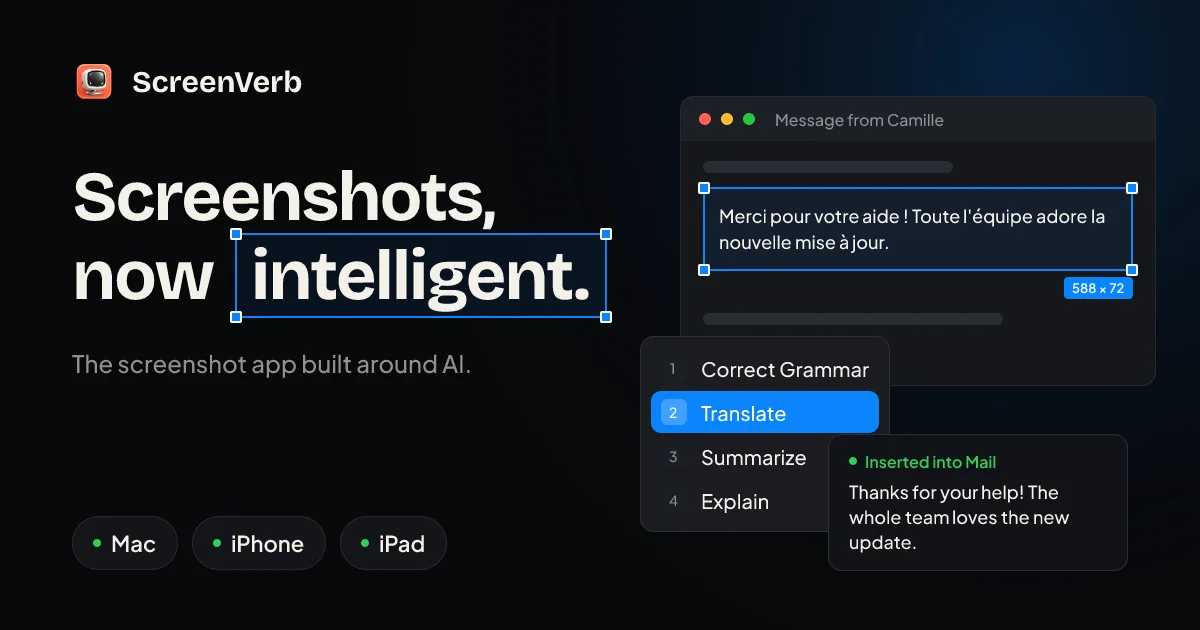
AI screenshot app for Mac, iPhone and iPad: capture a window or region, pick an AI action like translate or summarize, and drop the result where you were typing.
Deal status
Live deal · verified on the maker's site 50% off ScreenVerb Pro: Mac lifetime $14.50 and Universal lifetime (Mac, iPhone and iPad, up to 5 devices) $19.50 instead of $39, until Dec 5, 2026. maker’s announcementWhat ScreenVerb looks likeImage from ScreenVerb's official site
Get deal alerts by email
We send a weekly email in November with the Black Friday 2026 deals makers have confirmed. Free, unsubscribe anytime.
What does it do?
A shortcut in ScreenVerb grabs a Mac window, a region, or the whole display, then lets you mark the image up and, if you want, run an AI action such as extracting text, translating, or summarizing. The unpaid Mac app includes capture, a quick editor, and up to two AI actions. Pro unlocks a library that follows you on Apple's phones, tablets, and computers, scrolling capture, as many actions as you want when you supply a key, and a modest monthly cloud allowance.
Who is it for?
People who take screenshots all day and want the result inserted back into their work, with optional translation or a summary, without first bouncing through a separate website.
When would you use it?
- A bug report: Capture the crashing window, blur a name, add an arrow, and paste the still into the ticket without leaving the keyboard for long.
- A foreign-language email: Grab the passage, run a translate action, and drop the English text back into the reply you were already writing.
- A long settings page: With Pro, use scrolling capture to get the whole window, then search that capture later in the shared library.
- On the iPhone: Import a shot from Photos or the share sheet, run the same kind of action, and find it later in the library that also lives on the Mac.
Why pay for it?
Capture, markup, and history work even if you never touch AI, and the Mac app itself can stay free if two actions are enough. Paying $39 once for Pro covers up to five Apple devices, a year of updates, a synced library, scrolling capture, and unlimited actions when you bring your own key, plus a small included cloud quota.
What should you know?
- The free Mac app needs no account and includes window, region, and full-screen capture, a quick editor, and up to two AI actions.
- A $39 Pro license is paid once, covers up to five Macs, iPhones, and iPads, and includes one year of updates, after which extending updates is listed at $19 a year. It also includes 100 cloud AI runs a month and 10 GB of cloud storage.
- You may supply a key for OpenAI, Anthropic, Gemini, Groq, or OpenRouter, or run a model locally through Ollama. Those keys live in the Mac Keychain. If you use a cloud provider, the image is sent there unless you stay on a local model.
- An iPhone-only Pro plan is also sold as a $19 yearly App Store subscription. Max is a higher subscription with a larger cloud allowance and a web dashboard. The iPhone app is listed for iOS 17 or later.
Images from ScreenVerb's official site.
Prices and codes change. Last year's codes may no longer work — always confirm on the maker's site. Are you the maker? Send us your 2026 deal — listing is free.
Similar deals
- Aurio — Sound clear in every call and recording, because background noise is removed from your…
- Pippin — A Mac to-do list that writes itself from the text on your screen, then sends that text…
- Scry — Mac screenshot and screen recording app that reads the text in every capture so old…
- Tempus - AI Daily Planner — Plan the day with AI scheduling, AlarmKit reminders, and a clear visual timeline.
- Pie Menu — A ring of your chosen shortcuts that opens around the pointer, set up separately for…
- Blip AI Pro — Speak instead of typing on Mac, Windows, Linux or mobile, and get clean, formatted text…
ScreenVerb deal history
| Year | Offer | Dates | Source |
|---|---|---|---|
| 2026 | 50% off ScreenVerb Pro: Mac lifetime $14.50 and Universal lifetime (Mac, iPhone and iPad, up to 5 devices) $19.50 instead of $39, until Dec 5, 2026. | Dec 5, 2026 | Verified on the maker's site (announcement) |
Similar apps to ScreenVerb
- GetYouTubeTranscript — Pull the transcript of any captioned YouTube video in seconds, then copy, download, translate or summarize it. Live deal 30% off the first year of the annual plan (regularly $54 a year), applied at checkout (code BF26GYT also works); first payment only, renews at $54; Nov 1 to Dec 10, 2026
- Screenshot Studio — Turn your raw app captures into polished store screenshots, translate the captions and upload the whole set from one Mac app. Live deal Black Friday: 50% off all subscriptions and 33% off Lifetime, through Dec 1, 2026. No code stated; see the App Store for local prices.
- WhatPulse — Find out where your computer time really goes, with private stats on typing, clicks, apps, websites and bandwidth. Live deal 35% OFF the first year of an annual plan with code BFCM2026, Nov 27 to Dec 13, 2026
- Zone Share — A Mac screen-sharing tool that can show a mirrored region in a preview window or as a virtual camera for meetings. Live deal 50% off with code C5R6CAJO, Nov 25 to Nov 30, 2026
- Wishbar — A Mac menu bar app where you describe a widget in plain English and your own AI builds it, like a price alert or a live tracker. Live deal 50% off one-time licenses, no code needed: Solo (1 Mac) $19 instead of $39, Personal (2 Macs) $24 instead of $49, Family (5 Macs) $34 instead of $69. Nov 16 to Dec 7, 2026.
- FunKey-Mechanical Keyboard App — Mechanical keyboard sounds and haptics for typing on iPhone, iPad and Mac. Awaiting this year's deal; 2025 offer (unconfirmed): 50% OFF Lifetime
More in Mac app (525 apps) · More in iOS app (79 apps) · More in AI (100 apps) · More in Productivity (245 apps) · When Mac app Black Friday sales start · App Store vs direct purchase
FAQ
Is ScreenVerb on sale for Black Friday 2026?
Yes. The maker has confirmed a Black Friday 2026 deal: 50% off ScreenVerb Pro: Mac lifetime $14.50 and Universal lifetime (Mac, iPhone and iPad, up to 5 devices) $19.50 instead of $39, until Dec 5, 2026.. It runs until Dec 5, 2026. Last checked against the maker's page: Nov 15, 2026.
Does ScreenVerb have a lifetime or one-time price?
Pro is a one-time purchase; the Universal license covers up to 5 Macs, iPhones and iPads with 1 year of updates. iOS Pro is also sold from $19 a year, per the maker's pricing page. Check the maker's site for current pricing.
What platforms does ScreenVerb run on?
ScreenVerb is listed for Mac and iOS.
Compare alternatives: TextSniper alternatives · Paste alternatives
See also: AI apps Black Friday deals · Mac Black Friday 2026 deals.
For makers: add this badge
Optional. Copy this HTML to add a “Listed on IndieMarkdowns” badge that links to this deal page. It is never a condition of the listing.
A dark version uses https://indiemarkdowns.com/badge/listed-dark.svg. The older /badge/featured-light.svg and /badge/featured-dark.svg URLs work too.