LocalVoice Black Friday 2026 deal
| Status | Confirmed for Black Friday 2026 |
|---|---|
| Discount | 30% off |
| Deal price | $13.30 (USD) |
| Code | BF2026 |
| Ends | Dec 1, 2026 |
| Last checked | Nov 26, 2026 |
See also: Black Friday 2026 Mac app deals
Turns audio and video into text and subtitles on your Mac, and reads text or PDFs aloud to an audio file.
Deal status
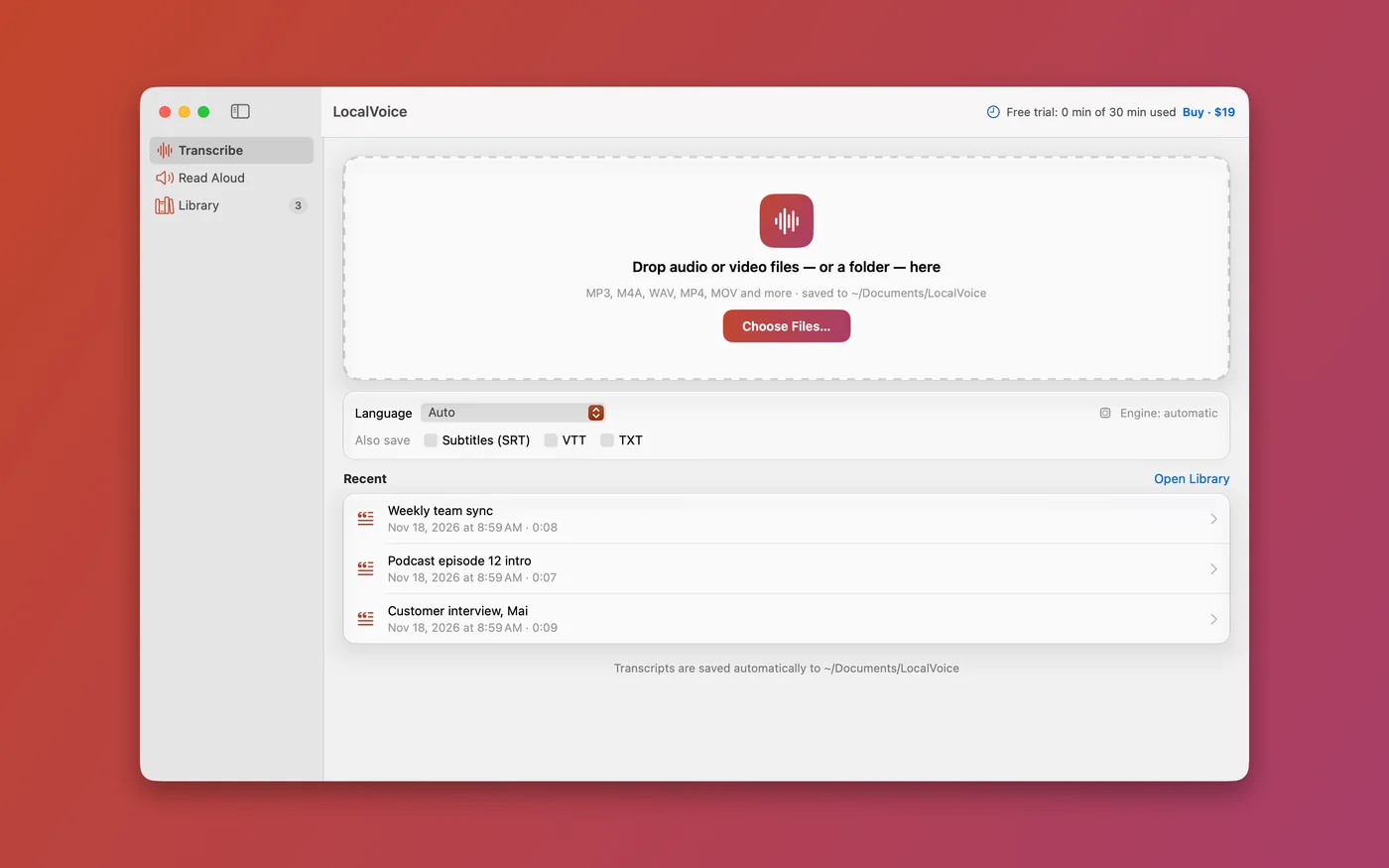
Live deal · verified on the maker's site With code BF2026, applied automatically at checkout: LocalVoice is $13.30 instead of $19, one-time purchase. Part of a 30% off sale on every Tidyware app. maker’s announcementWhat LocalVoice looks likeImage from LocalVoice's official site
Get deal alerts by email
We send a weekly email in November with the Black Friday 2026 deals makers have confirmed. Free, unsubscribe anytime.
What does it do?
LocalVoice transcribes audio and video files to text on your Mac and exports TXT, SRT, VTT or Markdown. It can also read text or PDFs aloud and save the result as an M4A audio file.
Who is it for?
People who record meetings, interviews or videos and want a transcript or subtitles without uploading the recording anywhere.
When would you use it?
- Transcribing a meeting: Drop an MP3, WAV, M4A or MP4 recording onto the window and export the finished transcript as Markdown or plain text that you can keep and search later.
- Making subtitles: Export SRT or VTT from a video file and load the result as captions in the player or editor you already use for that video.
- Listening to an article: Turn pasted text or a PDF into an M4A file that you can play later on a walk, with the reading done on your own Mac.
Why pay for it?
The maker says nothing is uploaded and that every transcript is also saved as a Markdown file you own, which keeps recordings and results on your own Mac. Tidyware also takes 30% off all of its apps until December 1, 2026.
What should you know?
- The first 30 minutes of transcription are free to try; the license is bought once and needs no account.
- It accepts MP3, WAV, M4A, AAC, FLAC, CAF, Opus, MP4 and MOV files.
- It uses the on-device speech engine from Apple where available, which is macOS 26 or later, per the product page.
- The oldest macOS it runs on is 14, Sonoma.
Official screenshot from tidyware.app, checked 2026-11-26.
Prices and codes change. Last year's codes may no longer work — always confirm on the maker's site. Are you the maker? Send us your 2026 deal — listing is free.
Similar deals
- CursorClip — Mac screen recorder that adds automatic zooms and pans while you capture, so product…
- PCalc — Scientific Mac calculator with RPN, number bases, and unit conversions built in.
- DepthField Photo — Mac photo editor that reads depth in a picture so blur, light and AI edits land on the…
- NightShiftKeeper — Keep your Mac's warmer Night Shift colors on day and night, even after it wakes from…
- Finbar — Search every Mac app's menus from the keyboard with fuzzy matching, recent commands and…
- DOT Audio Recorder — Capture system audio on a Mac and send a trimmed clip, plus detected key, tempo and…
LocalVoice deal history
| Year | Offer | Dates | Source |
|---|---|---|---|
| 2026 | 30% off with code BF2026, applied automatically at checkout: LocalVoice is $13.30 instead of $19, one-time purchase, until December 1, 2026. Part of a 30% off sale on every Tidyware app. Confirmed with the app maker. | Dec 1, 2026 | Verified on the maker's site (announcement) |
Similar apps to LocalVoice
- LensOCR — Pulls text out of screenshots, scanned PDFs and paused video, then translates it or reads it aloud. Live deal Black Friday: the LensOCR Pro lifetime unlock is 50% off, $29.99 instead of $59.99, from November 24 to November 30, 2026. It is a one-time in-app purchase on the Mac App Store and the sale price applies automatically, with no code. The sale covers the lifetime unlock only, not the monthly or yearly plans. US prices; other regions show the local equivalent.
- TextSniper — Grab text you can't select from videos, images, PDFs and screenshots on your Mac, then paste, read aloud or scan codes. Live deal 75% off the lifetime license with code BFIM2026, Nov 27 to Dec 4, 2026
- Pimosa — A toolbox of 36 utilities that convert and edit video, sound, pictures, GIFs and PDFs offline on a Mac or Windows PC. Drop in a file and nothing gets uploaded. Live deal 40% off Pimosa with code BLACKFRIDAY40, applied automatically at checkout: Personal $29 → $17.40 (1 device), Plus $49 → $29.40, one-time purchases with lifetime updates.
- How to Convert — Convert and compress thousands of file formats, from video and audio to documents and email, locally on Mac, Windows or Linux. Live deal 30% off with code BLACKFRIDAY for the week of Black Friday. Exact dates not announced.
- XGetter — Save video and audio from 70+ sites without a signup wall or watermark stamped on the file. Live deal Black Friday: 30% off XGetter with code BF2026. On the official site, Professional (1 device, lifetime license, one year of updates) is listed at $9.99 and Extended (2 devices) at $15. The code is entered at checkout. No end date is published.
- Wrimie (formerly Noota) - AI Note Taker — Turn videos, audio, PDFs, and documents into notes, summaries, and study cards. Awaiting this year's deal; 2025 offer (unconfirmed): 50% OFF Lifetime (auto-applied)
More in Mac app (723 apps) · When Mac app Black Friday sales start
FAQ
Is LocalVoice on sale for Black Friday 2026?
Yes. The maker's own site lists a Black Friday 2026 deal: 30% off with code BF2026, applied automatically at checkout: LocalVoice is $13.30 instead of $19, one-time purchase, until December 1, 2026. Part of a 30% off sale on every Tidyware app. It runs until Dec 1, 2026. Last checked against the maker's page: Nov 26, 2026.
Does LocalVoice have a lifetime or one-time price?
One-time purchase, per the official page; no subscription, per the maker's pricing page. Check the maker's site for current pricing.
What platforms does LocalVoice run on?
LocalVoice is listed for Mac.
See also: Confirmed deals Black Friday deals · Mac Black Friday 2026 deals.
For makers: add this badge
Optional. Copy this HTML to add a “Listed on IndieMarkdowns” badge that links to this deal page. It is never a condition of the listing.
A dark version uses https://indiemarkdowns.com/badge/listed-dark.svg. The older /badge/featured-light.svg and /badge/featured-dark.svg URLs work too.