At a glance

CursorClip Lifetime, BLACKFRIDAY
Best forFounders, teachers and indie developers who record product demos and lessons and want them to look edited without editing
Screen Studio, billed yearly
Best forTeams that send demo links to customers every day and record iPhone or iPad apps as well as the Mac
Quick verdict
CursorClip gives your recordings the same follow-the-cursor zooms, and $49 once costs less than half a year of Screen Studio on the yearly plan.
Screen Studio is worth renting when shareable links, cloud captions or phone recording are part of how you ship.
Both figures come from the price table below. A one-time licence is paid once, so its 3-year cost stays the same unless you buy an upgrade.
CursorClip records your Mac screen and moves the camera for you while you work: it zooms toward the cursor, pans as you move across the window, and adds a background and frame, so a demo looks edited the moment you stop recording. Screen Studio is the app that made this style popular, and it is now a subscription. If you want polished demos and tutorials without a monthly bill, CursorClip costs $49 once this week.
CursorClip pricing ↗ Screen Studio pricing ↗
Both go to the makers. Neither pays us.
What polished demos cost over time
| Plan | What you get | Year 1 | 3 years |
|---|---|---|---|
| CursorClip Lifetime, BLACKFRIDAY | Every feature and unlimited exports for up to three Macs, paid once. The code works until November 30. | $49 once | $49 |
| CursorClip Lifetime | Full price once the code expires. | $70 once | $70 |
| CursorClip yearly | All features on a subscription. | $29 | $87 |
| CursorClip monthly | All features at $9 a month. | $108 | $324 |
| Screen Studio, billed yearly | Every feature, 4K 60 fps export, shareable links and cloud transcripts, at $9 a month. | $108 | $324 |
| Screen Studio, billed monthly | Month-to-month billing at $29. | $348 | $1,044 |
Prices from cursorclip.com/pricing and screen.studio/pricing, read Nov 23, 2026; tax not included.
Worked example
Lina launches a new feature on Friday and needs a two-minute demo for the site and a vertical cut for social
She is a solo founder. She wants viewers to see exactly where she clicks, with her face in a corner, and she does not have an afternoon to spend in a video editor.
With CursorClip
Lina reads her script from a floating note that never appears in the video, and clicks through the feature as she normally would. CursorClip follows her cursor with zooms and pans as she records. Afterwards she drags one zoom later, trims a false start and turns on Smart Camera so her bubble moves out of the cursor’s way. She exports a 4K MP4 for the site and a portrait version with the same cuts for Reels. Recording and editing were free; the export licence is $49 once with the code.
With Screen Studio
Screen Studio would produce the same kind of zoomed demo, add animated captions from a cloud transcript, and give her a link she could paste straight into her launch email. It costs $108 a year on the yearly plan.
Over three years: $49 for CursorClip against $324 for Screen Studio.
A look inside CursorClip
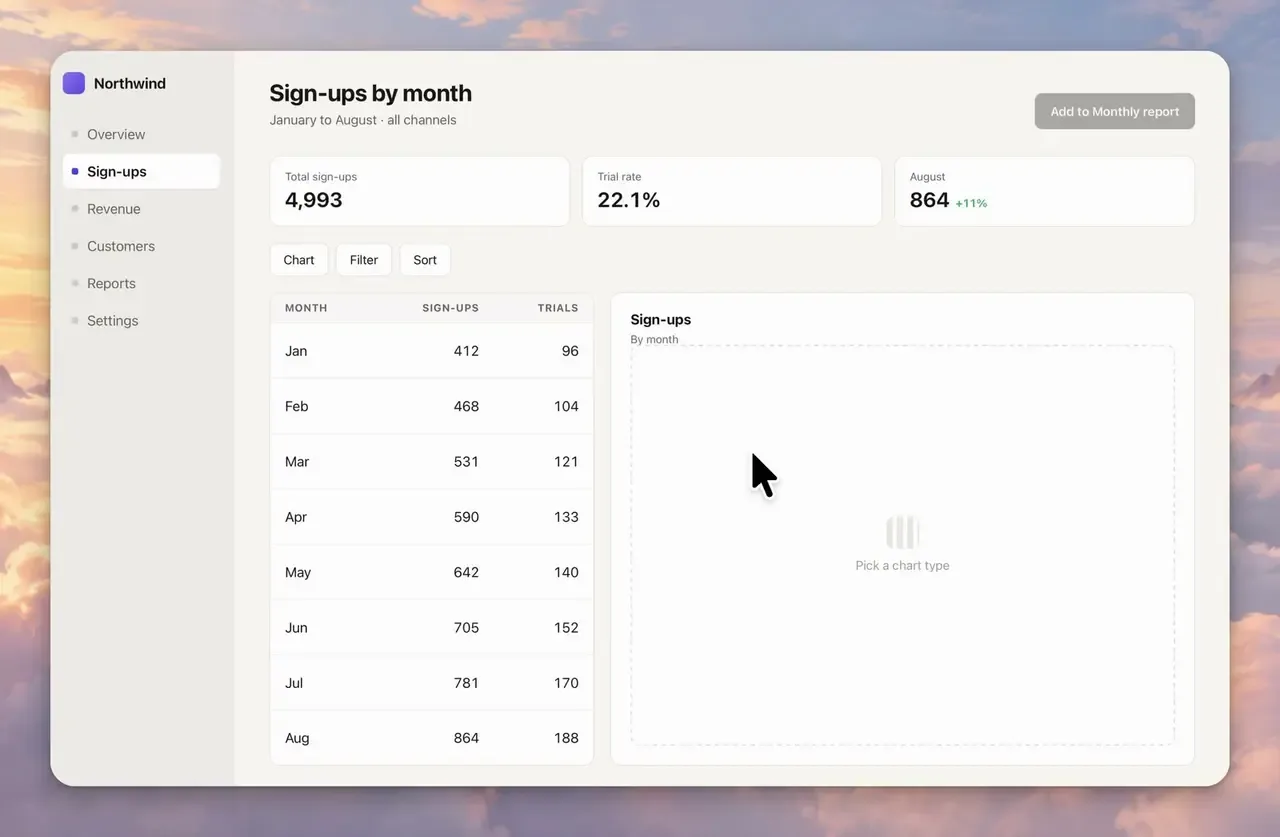
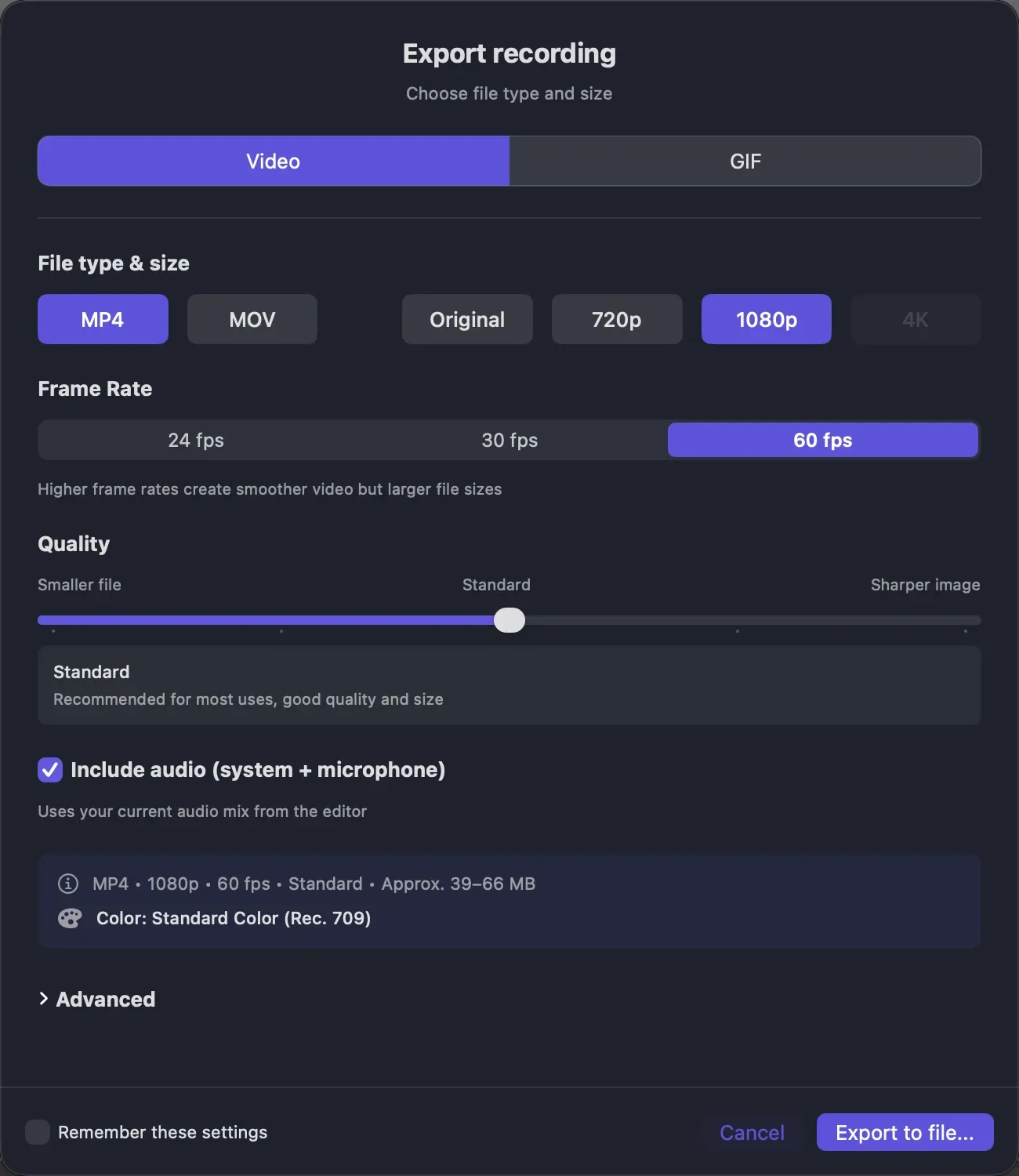
Images from CursorClip's site. More on our CursorClip deal page.
Feature by feature
| Topic | CursorClip | Screen Studio |
|---|---|---|
| Automatic zoom | Zooms and pans follow the cursor while you record; you can move, remove or add zoom frames later. | Animated zooms with two styles, editable on the timeline. |
| Cursor and clicks | Cursor styles and click feedback. | Cursor size and style can be changed after recording, with motion blur on fast moves. |
| Camera | Screen, camera or both, and Smart Camera moves the bubble away from the cursor. | Webcam with colour grading and background clean-up. |
| Script | Floating notes you can read while recording, kept out of the export. | Not listed on the pages we read. |
| Export | Exports to MP4, MOV and GIF at up to 4K and 60 frames a second, plus vertical and square cuts. | Up to 4K at 60 fps, versions for social media, and shareable links. |
| Other devices | Mac screen only. | Records a connected iPhone or iPad over USB. |
| Trying it | Recording and editing cost nothing; you pay only to export. 14-day money-back guarantee. | Paid plans only; students and educators get 40% off. |
| Requirements | macOS 13.5 or later, three Macs per licence. | macOS only. |
Privacy
CursorClip needs no account to record and edit, and your licence is stored on your Mac. Screen Studio does most work on the Mac too, but shareable links and cloud transcripts send the video or its audio to its servers; it says the audio is deleted once the transcript returns. If your demos show client data, check both privacy policies before sharing.
Where Screen Studio wins
- Shareable links let a customer watch a demo seconds after you stop recording.
- Cloud captions and transcripts save time if every video needs subtitles.
- It records iPhone and iPad apps, with a device frame that matches the model.
Who should pick which
- CursorClip Lifetime suits solo founders and indie developers who record a few demos a month and dislike paying for software every year.
- CursorClip also suits teachers and course creators who read from a script and need landscape and vertical versions of each lesson.
- Screen Studio suits product and sales teams who send demo links to customers daily or record mobile apps.
Our take: CursorClip delivers the polished zoom style at a one-time price, and you can test it fully before paying. Choose Screen Studio if instant links and captions are worth $108 every year.
Get CursorClip Lifetime for $49 until November 30
Enter BLACKFRIDAY at checkout; tax or VAT is added where it applies. Neither maker pays us anything.
Sources and notes, checked Nov 23, 2026
- CursorClip pricing: official Lifetime $70 once, or $49 with code BLACKFRIDAY until November 30, 2026; $29 a year or $9 a month; three Macs per licence; macOS 13.5 or later; free recording and editing; 14-day money-back guarantee.
- CursorClip homepage: automatic zoom and pan, cursor styles, Smart Camera, floating notes, saved looks, MP4, MOV and GIF export up to 4K 60 fps with portrait and square versions.
- Screen Studio pricing: official personal plans at $9 a month billed yearly or $29 billed monthly, every feature on every plan, 40% off for students and educators.
- Screen Studio homepage: zoom styles, cursor editing, motion blur, captions, shareable links, iPhone and iPad recording over USB, macOS only.
- Screen Studio’s yearly total is twelve months at $9. Three-year totals repeat today’s prices, and CursorClip’s lifetime totals count one payment. Taxes may be extra. We did not test either app.