CoolDock Black Friday 2026 deal
CoolDock has a confirmed Black Friday 2026 deal: 50% off CoolDock lifetime licenses, Forever Edition $115.99 to $57.99, no code listed; maker confirmed it runs Nov 12 to Dec 1. Checked against the maker's page; listing last checked Nov 18, 2026. Black Friday 2026 is Nov 27 and Cyber Monday is Nov 30.
| Status | Confirmed for Black Friday 2026 |
|---|---|
| Discount | 50% off |
| Code | No code needed |
| Ends | Dec 1, 2026 |
| Last checked | Nov 18, 2026 |
See also: Black Friday 2026 Mac app deals
A second Dock for your Mac with live widgets for music, todos, calendar, weather, search and system stats.
Deal status
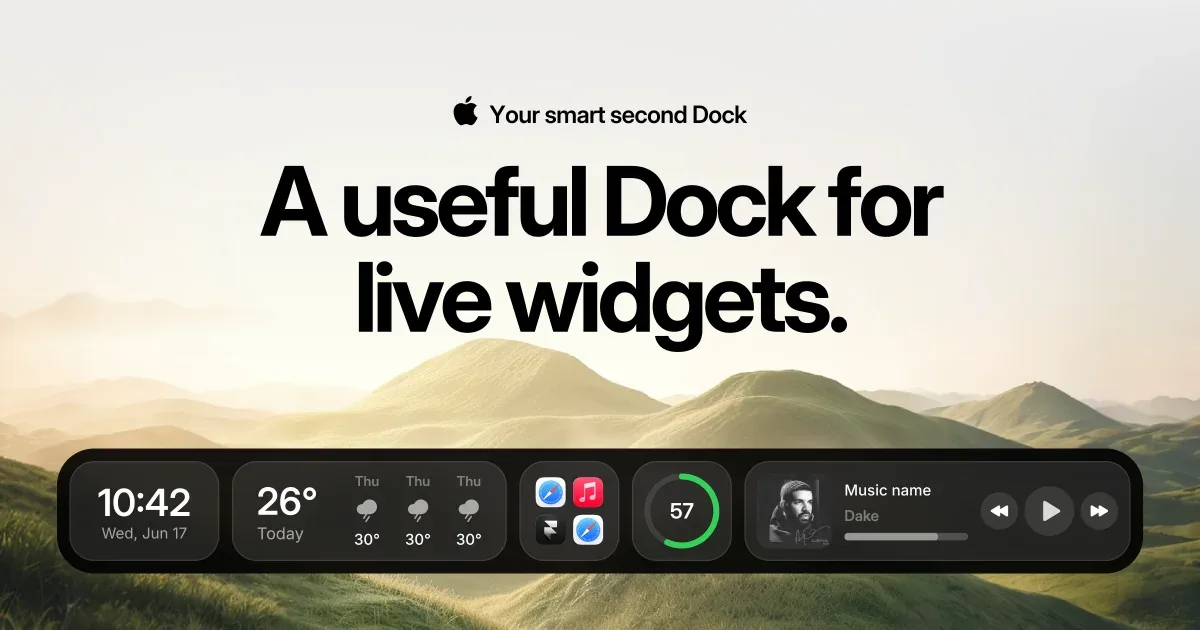
Live deal · verified on the maker's site 50% off CoolDock lifetime licenses, the maker's Black Friday price: Lifetime Access $46.50 to $23.25 for 1 device ($69.99 to $34.99 for 2, $89.99 to $44.99 for 3), Forever Edition $115.99 to $57.99. Shown on the maker's page, no code listed; maker confirmed it runs Nov 12 to Dec 1 maker’s announcementWhat CoolDock looks likeImage from CoolDock's official site
Get deal alerts by email
We send a weekly email in November with the Black Friday 2026 deals makers have confirmed. Free, unsubscribe anytime.
What does it do?
CoolDock adds another Dock on a Mac, sitting next to the one Apple already provides. In that strip you can pin programs and folders, and you can drop in widgets that stay current for music, reminders, calendar events, weather, search, system graphs, screenshots, the clipboard, and a temporary File Shelf. You can keep more than one layout and switch profiles, and the dock can float or be styled to your taste.
Who is it for?
Mac users who want the next meeting, the weather, a todo, or the current track visible at the edge of the screen, without opening a separate program for each of those jobs. It also fits people who would like a custom place for favorite programs and folders while leaving Apple's Dock in place, or hidden.
When would you use it?
- Starting the morning: Glance at today's calendar events, the weather, and a reminder list from this second Dock before you open Mail or a calendar program.
- Parking a file: Drop a temporary export onto the File Shelf, then grab it later when you are ready to attach it or file it away.
- Staying with a playlist: Control playback and see what is playing from the dock while you work in another program.
- Changing context: Move over to a different Dock profile when you go from a focus block to a meeting-heavy afternoon, so the widgets and pinned programs match the work.
Why pay for it?
Apple's Dock is built to launch programs. CoolDock sits beside it and keeps current information and small tools in the same kind of strip, so you can check an event, start a timer, or flip a system setting without leaving the desktop. Every plan is paid once, with no subscription. You can leave the original Dock visible or hide it and lean on CoolDock instead.
What should you know?
- The oldest supported system is macOS 14 Sonoma, and the app is built to work with extra displays.
- CoolDock does not take the place of Apple's Dock. You can use both, or hide the original Dock and rely on CoolDock.
- A widget can request system access only when the feature needs it. That can include your calendar, reminder list, address book, photo library, microphone, Accessibility, or Automation. Local widgets run on the Mac. Connected widgets use only the access that feature requires.
- The One Year License is $14.99 for one Mac. Access lasts twelve months and then ends, and the site says the plan does not renew on its own.
- A Lifetime Access key is bought once and covers one, two, or three Macs, regularly $46.50, $69.99, or $89.99. Upgrades are included for the first twelve months, and the build you already have continues to run after that window.
- The Forever Edition is a one-time payment that covers as many as five Macs and all later upgrades. Every plan includes a fourteen-day window in which you can ask for a refund.
Images from CoolDock.
Prices and codes change. Last year's codes may no longer work — always confirm on the maker's site. Are you the maker? Send us your 2026 deal — listing is free.
Featured in: Swish Black Friday 2026: 6 window and dock apps on sale instead
Similar deals
- BuhoCleaner — Reclaim gigabytes of storage, uninstall apps completely and keep an eye on your Mac's…
- Scry — Mac screenshot and screen recording app that reads the text in every capture so old…
- ARADAR Music Player — A Mac music player that organizes, plays and checks your tracks, with loudness…
- Looq — Quick Look add-on for Mac that previews Markdown, LaTeX, notebooks, archives, 3D models…
- Workspaces — One-click Mac launcher that opens a project's files, folders, sites and apps together.
- Pasta — Visual Mac clipboard history with filters, favorites and Pro collections beyond twenty…
CoolDock deal history
| Year | Offer | Dates | Source |
|---|---|---|---|
| 2026 | 50% off CoolDock lifetime licenses, the maker's Black Friday price: Lifetime Access $46.50 to $23.25 for 1 device ($69.99 to $34.99 for 2, $89.99 to $44.99 for 3), Forever Edition $115.99 to $57.99. Shown on the maker's page, no code listed; maker confirmed it runs Nov 12 to Dec 1 | Nov 12, 2026 – Dec 1, 2026 | Verified on the maker's site (announcement) |
Similar apps to CoolDock
- DockX — Turn your Mac's Dock and menu bar into a live dashboard for network speed, system stats, world clocks and memos. Live deal 25% OFF on the App Store, or with code BF2026 at dockx.app checkout (DockX Pro $3.99 to $2.99)
- DockMagic — A customizable second Dock for macOS, with widgets and Dock profiles that sit alongside the Apple Dock. Live deal Black Friday lifetime licences, no code, until November 30, 2026 at 23:59 UTC: 1 Mac 48% off, $12.99 instead of $25; 2 Macs 50% off, $19.99 instead of $40; 3 Macs 50% off, $29.99 instead of $60.
- Ganella — A native Mac Dock replacement with live widgets, so apps can show what's going on and let you act on it in one click. Live deal 25% off with code BLACK26, Nov 15 to Nov 30, 2026
- DockView 2 (and MacPlus apps) — Hover over any Dock icon on your Mac to see live previews of that app's windows, including minimized ones. Live deal 30% off with code MACPLUSBLACKFRIDAY26 on all MacPlus Software apps, Nov 1 to 30, 2026. DockView 2 Standard $14.99, now $10.49; Lifetime $49.99, now $34.99. Also ActiveDock 2, Tab Finder 2, MultiDock 2, SuperTab 7, Command-Tab Plus 2, Tree Outliner, Classic Commander, Quick Exposé 3, Stage View and ContextClip.
- Teletable — Live football scores, tables, and other sports stats on a Mac, shown in a retro teletext layout. Awaiting this year's deal; 2025 offer (unconfirmed): 100% FREE until Dec 3rd
- BetterNotif — Get a native Mac notification for every Stripe sale, refund and dispute, with live revenue stats in your menu bar. Awaiting this year's deal; 2025 offer (unconfirmed): 30% OFF with code BF25
More in Mac app (525 apps) · More in Productivity (245 apps) · More in Utilities (174 apps) · When Mac app Black Friday sales start
FAQ
Is CoolDock on sale for Black Friday 2026?
Yes. The maker has confirmed a Black Friday 2026 deal: 50% off CoolDock lifetime licenses, the maker's Black Friday price: Lifetime Access $46.50 to $23.25 for 1 device ($69.99 to $34.99 for 2, $89.99 to $44.99 for 3), Forever Edition $115.99 to $57.99. Shown on the maker's page, no code listed; maker confirmed it runs Nov 12 to Dec 1. It runs until Dec 1, 2026. Last checked against the maker's page: Nov 18, 2026.
Does CoolDock have a lifetime or one-time price?
Yes. Lifetime Access keeps working forever (one year of updates); Forever Edition includes all future updates, per the maker's pricing page. Check the maker's site for current pricing.
What platforms does CoolDock run on?
CoolDock is listed for Mac.
Compare alternatives: Paste alternatives · TextSniper alternatives
See also: Utilities Black Friday deals · Mac Black Friday 2026 deals.
For makers: add this badge
Optional. Copy this HTML to add a “Listed on IndieMarkdowns” badge that links to this deal page. It is never a condition of the listing.
A dark version uses https://indiemarkdowns.com/badge/listed-dark.svg. The older /badge/featured-light.svg and /badge/featured-dark.svg URLs work too.