At a glance
SpacePeek Pro, SPACEPEEKBF30
Best forDesigners and developers who get big ZIPs from clients and need one file out without unpacking the lot
Folder Preview
Best forOwners of older Macs who just want to see a folder’s or archive’s file list
Quick verdict
SpacePeek lets you search, read and copy files inside a folder or ZIP right from the Space bar, and the free version is a fair trial.
Folder Preview is the plain, cheaper list view, and it is the one to choose on macOS 12 to 15.3.
Both figures come from the price table below. A one-time licence is paid once, so its 3-year cost stays the same unless you buy an upgrade.
Finder’s Space bar shows you a file, but a folder or a ZIP just gets a big icon. SpacePeek and Folder Preview both fix that by listing what is inside. SpacePeek goes further: you can search the folder you are looking at, read a README, PDF or source file inside it, see what takes up the space, and with Pro copy one file out of an archive without unpacking the rest. It is free to download, and Pro costs $2.79 once with this week’s code. Folder Preview is a simpler $1.99 extension that also runs on older macOS versions.
SpacePeek on the Mac App Store ↗ Folder Preview on the Mac App Store ↗
Two App Store links, and neither pays us a fee.
What you pay
| Purchase | What you get | Year 1 | 3 years |
|---|---|---|---|
| SpacePeek Pro, SPACEPEEKBF30 | The Pro unlock with the Black Friday code, Family Sharing included. | $2.79 once | $2.79 |
| SpacePeek Pro | Same unlock without the code. | $3.99 once | $3.99 |
| SpacePeek free | Search, previews and the folder overview, one level deep. | $0 | $0 |
| Folder Preview | The Quick Look extension, paid on download. | $1.99 once | $1.99 |
Read Nov 23, 2026 from the US store listings for SpacePeek (id 6777129953) and Folder Preview (id 6698876601), and from spacepeek.space.
Worked example
Ahmed gets a 2 GB ZIP of client assets and needs one logo file for a slide
He does not want to unpack two gigabytes just to find a single SVG, and he is not sure what the file is called.
With SpacePeek
He selects the ZIP and presses Space. The contents appear in Quick Look, he types “logo” in the search field, previews the match, then presses Command-C and pastes that one file into his slides folder with Pro. Nothing else is extracted.
With Folder Preview
The Space bar shows the archive’s file list with columns and image thumbnails, and he can right-click to copy a file’s path. Finding the logo means scrolling the list.
His cost: $2.79 once for SpacePeek Pro with the code, or $1.99 for Folder Preview.
A look inside SpacePeek
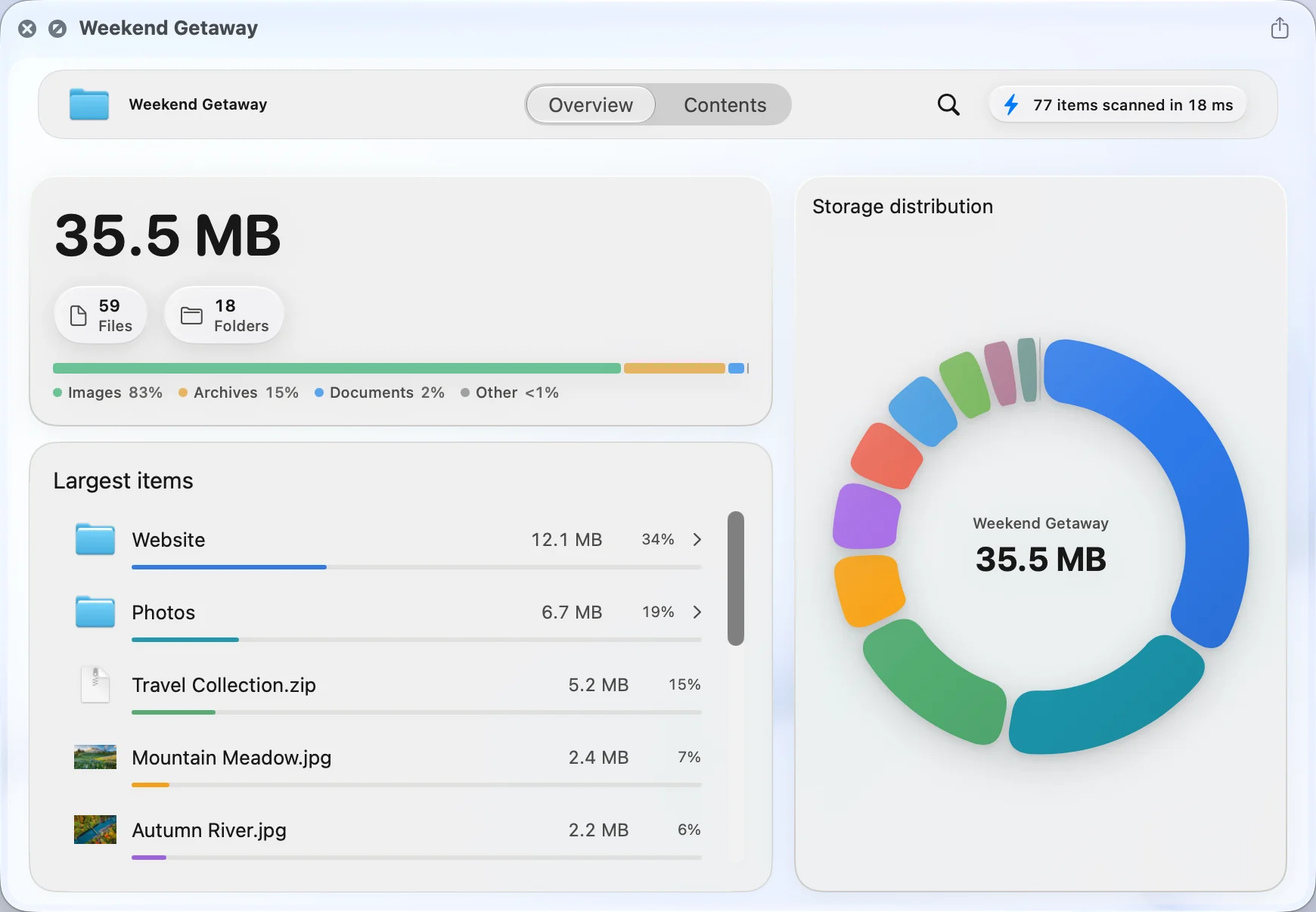
Images from SpacePeek's site. More on our SpacePeek deal page.
Feature by feature
| Feature | SpacePeek | Folder Preview |
|---|---|---|
| Archives | ZIP, 7z and RAR. | ZIP, TAR, GZ, 7z and RAR. |
| Search | Filename search inside the previewed folder or archive; Pro reveals results in Finder. | Not described on its listing. |
| Previews inside | Images, documents, Markdown and source code. | Thumbnails for images, SVGs and PDFs. |
| Taking files out | Pro copies a single file from an archive, up to 100 MiB. | Right-click to copy a file or its path. |
| Space used | An overview of the folder’s total size and its biggest files. | Optional columns in the list. |
| Requirements | macOS 15.4 or later. | macOS 12 or later. |
Privacy
SpacePeek scans and previews on your Mac, uploads nothing and has no analytics or ad code, according to its privacy policy. Folder Preview is also a local Quick Look extension; Apple’s privacy summary is on its store page.
Where Folder Preview wins
- It runs on macOS 12 and later, so it suits Macs that cannot install macOS 15.4.
- It reads TAR and GZ archives too.
- One $1.99 payment, with no free tier and upgrade to think about.
Which to install
- SpacePeek suits designers, developers and anyone who receives big ZIPs and needs one file from them fast.
- SpacePeek also suits people tidying a crowded Downloads folder who want to see what is taking the space before opening anything.
- Folder Preview suits owners of older Macs who just want a list of what is inside a folder.
Our take: try SpacePeek free first. If you copy files out of archives even once a week, $2.79 for Pro pays for itself in saved unpacking.
Unlock SpacePeek Pro for $2.79
Download SpacePeek free, then redeem SPACEPEEKBF30 for your first Pro purchase. It ends December 1 at 08:00 UTC or after 1,000 uses. No affiliate link here.
SpacePeek on the Mac App Store ↗ Folder Preview on the Mac App Store ↗
Sources and notes, checked Nov 23, 2026
- SpacePeek on the Mac App Store: official listing, free download, Pro in-app purchase $3.99, version 2.4.2 released November 21, 2026, macOS 15.4 or later.
- SpacePeek official site and privacy policy: free and Pro features, 100 MiB copy limit, on-device processing. The maker confirmed the SPACEPEEKBF30 code for our listing: about 30% off, US$2.79, first Pro purchase only, until 08:00 UTC on December 1, 2026 (12:00 AM PT) or 1,000 redemptions.
- Folder Preview on the Mac App Store: official listing by Anybox, $1.99, version 3.1.1, macOS 12 or later, supported archive types. The same developer also sells a separate Pro edition, which we did not price.
- Our earlier plan compared SpacePeek with Peek by Big Z Labs. Peek improves Quick Look for documents and code, and its listing does not cover folders or archives, so Folder Preview is the fair match.