At a glance

Sortroom Pro Lifetime, launch price
Best forInstagram and Facebook creators with years of shoots on SSDs who need to know what to post next
Adobe Bridge
Best forCreative Cloud users who tag, rate and edit in Photoshop and Camera Raw
Quick verdict
Sortroom labels every photo by the places you name, groups them by subject on your Mac, and remembers what you already posted.
Adobe Bridge costs nothing and is the natural hub if you edit in Photoshop and Camera Raw.
Both figures come from the price table below. A one-time licence is paid once, so its 3-year cost stays the same unless you buy an upgrade.
Sortroom and Adobe Bridge both let you browse and organise photos where they already sit, on your Mac or an external SSD, without importing them into a library. Sortroom is built for photographers who also post online: name a spot once, such as “Home” or “Grandma’s”, and every photo shot there gets that label, years back; on-device analysis groups shots by subject; and a post log tracks what you have shared and what to post next. Adobe Bridge is Adobe’s free asset manager, strongest when your work moves on into Photoshop, Camera Raw and the rest of Creative Cloud. For social creators with years of shoots on drives, Sortroom Pro is $39.99 once until December 2; Adobe users can stay in Bridge for free.
Neither company pays us anything.
Price comparison
| Option | What you get | Year 1 | 3 years |
|---|---|---|---|
| Sortroom Pro Lifetime, launch price | Places, labels, renaming, moving, duplicates and the post log, paid once, until December 2. | $39.99 once | $39.99 |
| Sortroom Pro Lifetime | The same unlock after December 2. | $49.99 once | $49.99 |
| Sortroom free | Download and browse every photo in your folders. | $0 | $0 |
| Adobe Bridge | Adobe’s asset manager, a free download. | $0 | $0 |
Read Nov 23, 2026 from sortroom.app, the maker’s confirmation for our listing, and adobe.com/products/bridge. US prices.
Worked example
Rafi has five years of macro and street photos on a portable SSD and posts three times a week
Files are called IMG_4821 or DSC_0012, folders are a mess, and he cannot remember which flower shots he already posted.
Rafi in Sortroom
He plugs in the SSD and photos start appearing during the scan. He names his rooftop garden once, and every macro shot taken there, old and new, gets the label. Sortroom groups flowers, sky and food shots on his Mac. He marks six as post-worthy, plans a carousel, and logs it as posted. A bulk rename turns IMG files into names with the date and place, and he can reverse any of it.
Rafi in Bridge
Bridge shows the same folders with rich previews. He can rate, label and keyword photos, batch rename them and open RAW files in Camera Raw. Place labels from GPS and a posting log are not part of it, so he would keep those records elsewhere.
Rafi’s outlay: $39.99 once for Sortroom Pro before December 2, or $0 for Bridge.
A look inside Sortroom
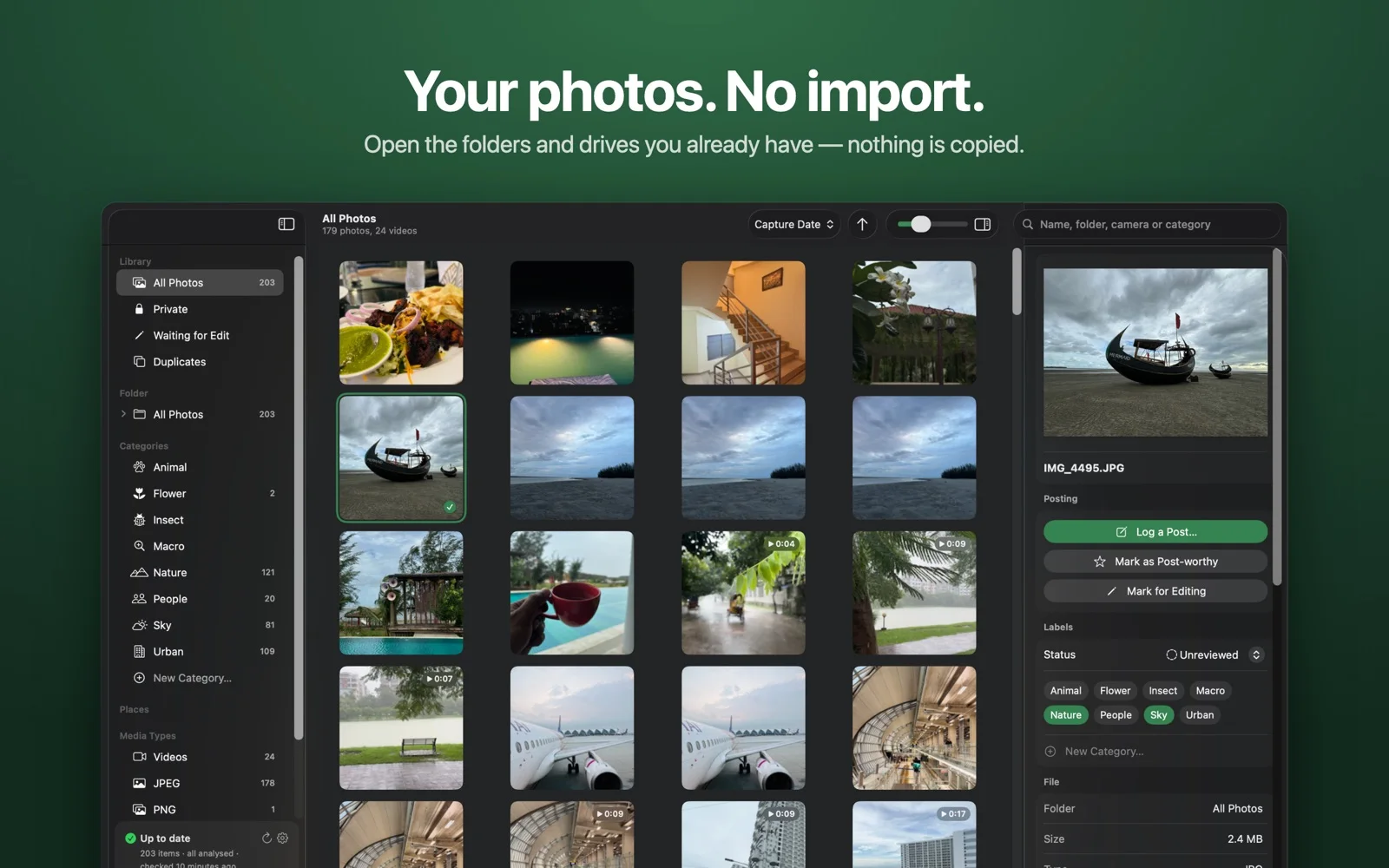
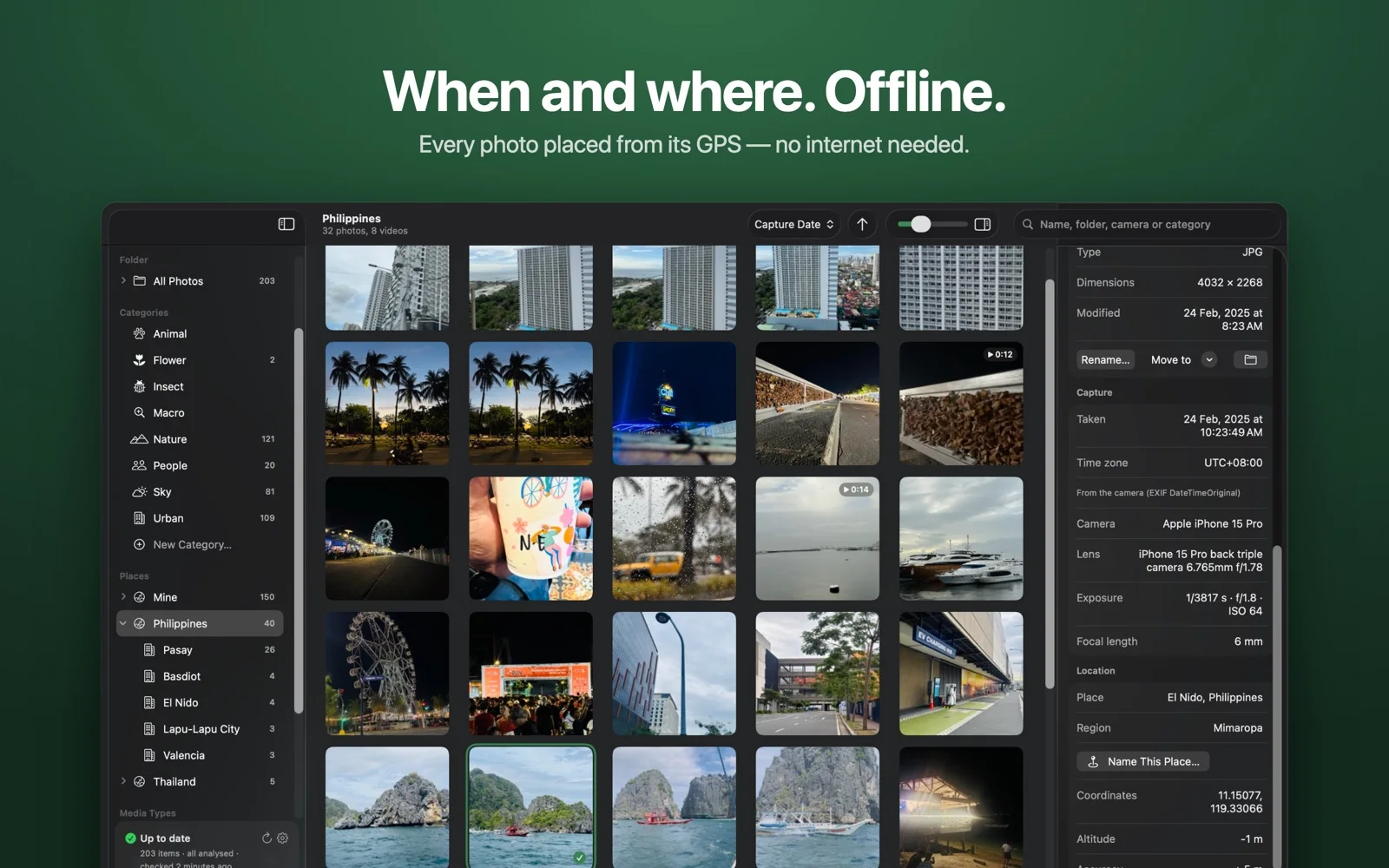
Mac screenshots from the Sortroom Mac App Store listing (https://apps.apple.com/app/id6816434231), seller Nabil Ahmed Emon. More on our Sortroom deal page.
Feature comparison
| Feature | Sortroom | Adobe Bridge |
|---|---|---|
| Library model | Reads folders and drives in place; nothing is copied, re-saved or re-compressed. | Browses folders in place with thumbnails and previews. |
| Finding photos | Your own named places from GPS, on-device subject groups, search. | Labels, ratings, keywords, collections, filters and metadata search. |
| Posting | Post-worthy, planned and posted marks; plans for carousels, reels, stories and feed posts. | Export panel, PDF contact sheets, Adobe Stock and Adobe Portfolio publishing. |
| Editing | Files are renamed or moved once you approve the plan, and you can undo. | Opens files in Photoshop and Camera Raw; batch rename and export. |
| Formats | Common image formats including HEIC and WebP, plus Canon, Nikon, Sony, Fujifilm and other RAW files. | Photos plus Photoshop, InDesign, Illustrator, After Effects and Substance 3D files. |
| Requirements | macOS 26. | Free download from Adobe. |
Privacy and AI
Sortroom has no account and no server, and its image analysis runs on your Mac with Apple’s Vision. An optional Claude Desktop link is off by default; when you turn it on, file names, labels and city-level place names can reach Anthropic, and folders you mark private are never shared. Bridge works with your local files and connects to Creative Cloud services when you use them.
Where Adobe Bridge leads
- It is free and handles design files, not just photos.
- Camera Raw and Photoshop are one click away for editing.
- It edits metadata, keywords and ratings in detail.
Who should use which
- Sortroom suits Instagram and Facebook creators who keep years of photos on drives and want to know what to post next.
- Sortroom also suits families and travellers who want photos grouped by the places that matter to them, without uploading anything.
- Adobe Bridge suits Creative Cloud users who edit in Photoshop and Camera Raw and tag for clients.
Our take: if posting is part of why you shoot, Sortroom remembers where each photo was taken and what you have shared. Bridge is the free, powerful hub for Adobe workflows.
Sortroom Pro Lifetime at $39.99 until December 2
Download Sortroom free and buy Pro inside the app; the price then rises to $49.99. No affiliate payment is involved.
Sources and notes, checked Nov 23, 2026
- Sortroom official site: no import, places, on-device grouping, post planning, undo, supported formats, optional Claude Desktop connection.
- The maker confirmed the Pro Lifetime launch price for our listing: $39.99 one-time until December 2, 2026, then $49.99, run as its Black Friday offer. Sortroom is free to download and browse; US prices, other countries vary. It needs macOS 26.
- Adobe Bridge official page: free download, labels, ratings, keywords, collections, Photo Downloader, Camera Raw, batch rename and export, PDF contact sheets, Adobe Stock and Portfolio.
- Places rely on GPS data in each photo; camera files without location need placing by hand. We did not test either app.