SMBAct vs Rectangle
At a glance

Best forPeople who work across Windows, macOS and Linux and want a fuzzy window switcher with the manager
Best forMac-only users who want free keyboard and drag-to-edge window snapping
Quick verdict
SMBAct is the pick for three operating systems and a typing-based window switcher, with a 14-day trial.
Rectangle fits anyone who stays on a Mac, and it costs nothing.
Both figures come from the price table below. A one-time license is paid once, so its 3-year cost stays the same unless you buy an upgrade.
Rectangle is free, open source and the usual first answer for snapping Mac windows with the keyboard. SMBAct costs money and asks a different question: what if the same hotkeys and the same fuzzy search worked on Windows, macOS and Linux, and a window switcher came in the same app? If you only use a Mac and only need to snap windows, Rectangle already does it. SMBAct earns its price if you switch between systems or want to find any window by typing.
Both buttons lead to the developers’ own pages; we get no payment from either.
What each one costs
| Plan | What you get | Year 1 | 3 years |
|---|---|---|---|
| SMBAct Standard, Black Friday | One device, all features, a year of updates and email support. 30% off with BF2026 through December 31. Prices exclude VAT, and 30% off €14.99 works out to this amount. | €10.49 | €10.49 |
| SMBAct Standard, regular | The price after the sale ends. Later years of updates cost 50% less. | €14.99 | €14.99 |
| SMBAct Special, Black Friday | Three devices on the same terms, 30% off €29.99 with the code. | €20.99 | €20.99 |
| Rectangle | Free, open source, built for macOS 14 or newer. | $0 | $0 |
| Rectangle Pro | A ten-day trial. Its price loads in a buy dialog and is missing from the static page. | – | – |
From smblob.com/products/smbact and rectangleapp.com on Nov 28, 2026. SMBAct is a one-time purchase with a year of updates included. The sale amounts of €10.49 and €20.99 are our arithmetic from the 30% code, not figures printed on the page. The 3-year total shows the first-year price and leaves out the optional discounted update in later years.
Worked example
Dana uses a MacBook at home, a Windows PC at the office and a Linux desktop for side projects
She wants the same shortcut to put a window in the left half or the center on all three, and a quick way to jump to any open window without Alt-Tab. She has three devices.
With SMBAct
Dana installs SMBAct on each machine and gets the same set of positions and sizes, repeated pressing to cycle through them, and a switcher window where she types a few letters to reach a window. On the Mac she grants Accessibility and Screen Recording once. Three devices cost €20.99 with the sale code, and she can trial it for 14 days with full features first.
With Rectangle
Dana uses Rectangle on the Mac, where it snaps by keyboard shortcut or by dragging to a screen edge, and repeating a shortcut cycles window sizes. It costs nothing. On the Windows PC and the Linux desktop she needs other tools with other shortcuts, because Rectangle is a Mac app.
Their spend: €20.99 for SMBAct on three devices, or $0 for Rectangle on the Mac alone.
A look inside SMBAct
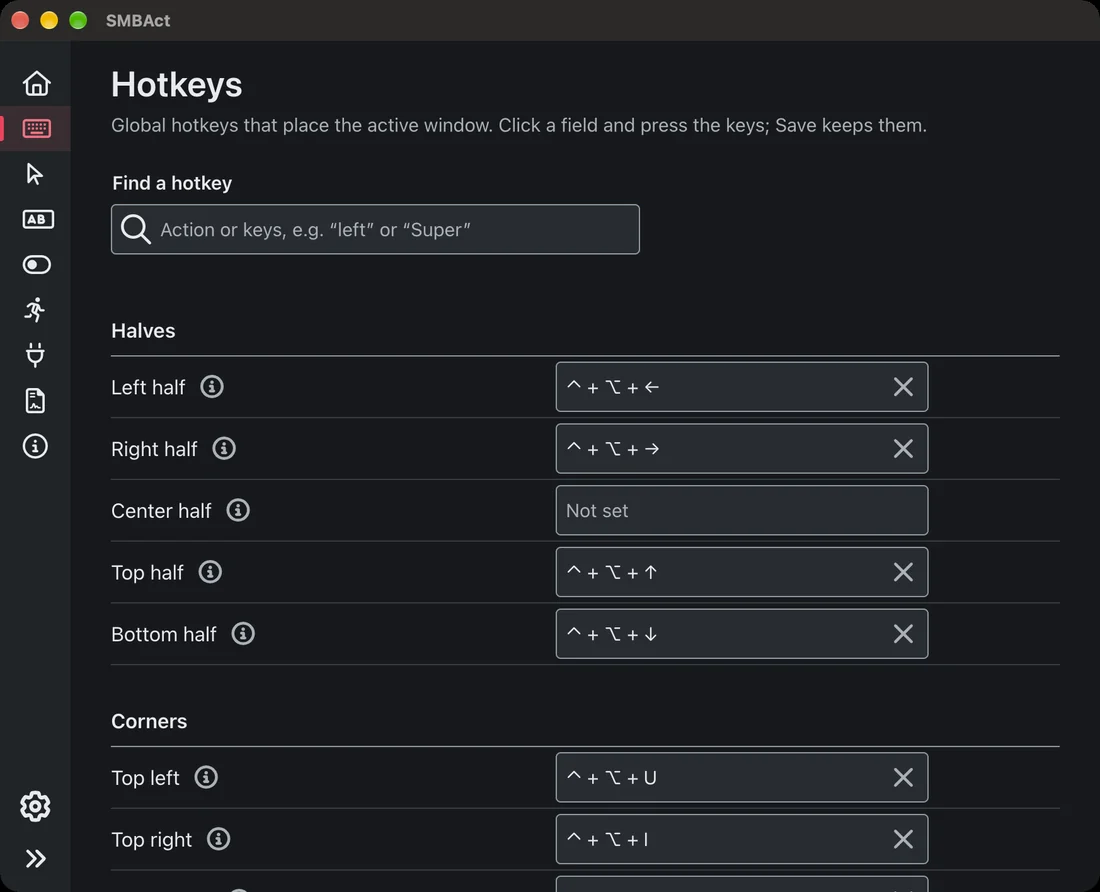
Screenshot supplied by the maker (smblob.com). More on our SMBAct deal page.
Side by side
| Topic | SMBAct | Rectangle |
|---|---|---|
| Systems | Windows, macOS and Linux, with builds for each. | macOS 14 or newer. |
| Moving windows | Hotkeys for positions and sizes, repeated pressing cycles actions, and a fuzzy search of window actions. | Keyboard shortcuts or snap areas on screen edges and corners, and repeated shortcuts cycle through sizes. |
| Switching windows | A switcher window with fuzzy search of any window or app, plus minimize, close or full screen from it. | Its home page describes moving and resizing windows, with no switcher. |
| Several displays | Move windows between displays, activate windows on the active display, main display or pointer display, and hide windows on one display. | Portrait display layouts are supported, and Pro adds more layout control. |
| Excluding apps | A blacklist keeps chosen apps out of the switcher and out of SMBAct’s actions. | No blacklist is mentioned on its home page. |
| Trial and payment | 14-day trial with full features and no credit card; one-time license, optional updates after year one. | Free forever; Pro has a 10-day trial. |
| Permissions on macOS | Notifications, Screen Recording and Accessibility. | No permission list appears on its home page. |
| Updates | Checks for updates and installs them after you confirm; version 2.2.1 shipped November 26, 2026. | Open-source project with sponsor and donation links. |
Privacy
SMBAct’s privacy policy covers its websites, which the policy says use log files, cookies and Google Analytics, and your license sits in a GigLabo account after purchase. The app needs Accessibility and Screen Recording on macOS to see and move windows. Rectangle is open source, so its code can be read, and its site does not ask for payment.
Where Rectangle wins
- It costs nothing and is open source, so you can try it, read it and keep it with no license.
- Drag-to-edge snap areas work without remembering a shortcut.
- Its Multitouch app now includes all of Rectangle Pro, for trackpad gestures from macOS 13.5 up.
Who should pick which
- SMBAct suits you if you work across Windows, macOS and Linux and want one habit for all of them.
- SMBAct is also the one with a switcher that finds windows by typing, inside the app that moves them.
- Rectangle suits you if you only use a Mac and mainly snap windows to halves, thirds and corners.
- Rectangle is the safe first try for anyone, since it is free.
Our take: start with Rectangle if you are on one Mac. Pay for SMBAct only if a second operating system or the fuzzy window switcher solves a problem you really have, and use its 14-day trial to find out before the sale ends on December 31.
Try each for free
Rectangle is free, and SMBAct has a 14-day trial with full features. The BF2026 code is applied at checkout until December 31.
Sources and notes, checked Nov 28, 2026
- SMBAct product page: window manager and switcher for Windows, macOS and Linux, 14-day trial, Black Friday 30% off with BF2026 until December 31, Standard €14.99 for 1 device, Special €29.99 for 3, one year of updates, 50% discount on later updates, prices excluding VAT.
- SMBAct documentation: macOS permissions for notifications, Screen Recording and Accessibility, builds for each system.
- SMBAct release notes: versions 2.2.1 (Nov 26, 2026) back to 1.0.2, update checks.
- SMBAct privacy policy: covers its websites, log files, cookies, Google Analytics, GigLabo account.
- Rectangle home page: free and open source, macOS 14 and later, shortcuts and snap areas, cycling sizes, portrait layouts, Spectacle successor, Multitouch includes Rectangle Pro.
- Rectangle Pro page: free for 10 days, one license on 3 devices, trackpad support on macOS 13.5 and later. We did not run either app.