At a glance
Paperlight, launch price
Best forProduct managers and support staff who take dozens of screenshots a day and need to find yesterday’s quickly
Shottr
Best forDesigners and front-end developers who annotate, pixelate and measure every capture
Quick verdict
Paperlight keeps every capture off the Desktop and answers questions about them on your Mac, from error codes to receipt totals.
Shottr is the better markup and measuring tool, and you can pay what you like for it.
Both figures come from the price table below. A one-time licence is paid once, so its 3-year cost stays the same unless you buy an upgrade.
Paperlight rethinks where screenshots go. Instead of landing on the Desktop as files called “Screenshot”, each capture hangs in a little strip under the menu bar, glowing when new and dimming as it ages, so you can click to copy or drag it into any app ready to use. You can then ask your captures a question, translate one in place or pull a table straight into a spreadsheet, all on your Mac. Shottr is the tiny, fast capture-and-markup tool loved by designers, with rulers, scrolling screenshots and pay-what-you-want pricing. If your problem is a Desktop full of captures, Paperlight solves it for $9.99 once until December 3; if you need precise markup and measuring, Shottr is excellent and can cost nothing.
Two plain links; neither maker pays us.
Prices, year one and year three
| Licence | What you get | Year 1 | 3 years |
|---|---|---|---|
| Paperlight, launch price | Two Macs, one Windows PC and one Linux PC, future updates included; until December 3. | $9.99 once | $9.99 |
| Paperlight | The same licence after the launch period. | $14.99 once | $14.99 |
| Shottr | Pay what you want; $0 is accepted, and a paid licence unlocks extras such as uploads. | $0 | $0 |
Read Nov 23, 2026 from getpaperlight.com and from shottr.cc with its Gumroad product page.
Worked example
Hana, a product manager, takes 40 screenshots a day for Slack threads, Jira tickets and slides
Her Desktop is a wall of files, and she keeps losing the one with yesterday’s error code. Some captures include customer emails she must not share.
Hana with Paperlight
Captures line up under the menu bar instead of on the Desktop. She drags one into Slack and it arrives sized for the app with metadata removed. Control-Option-P fans her last five above the cursor for quick pasting. To find yesterday’s error she ends a search with a question mark, and Paperlight locates it by reading every capture on her Mac. She pins the roadmap diagram so it never fades.
Hana with Shottr
Shottr opens each capture for quick markup, pixelates the customer email and adds an arrow in seconds. Saved files still need a home, and finding an old one means searching her folders.
Hana’s cost: $9.99 once for Paperlight until December 3, or whatever she chooses to pay for Shottr.
A look inside Paperlight
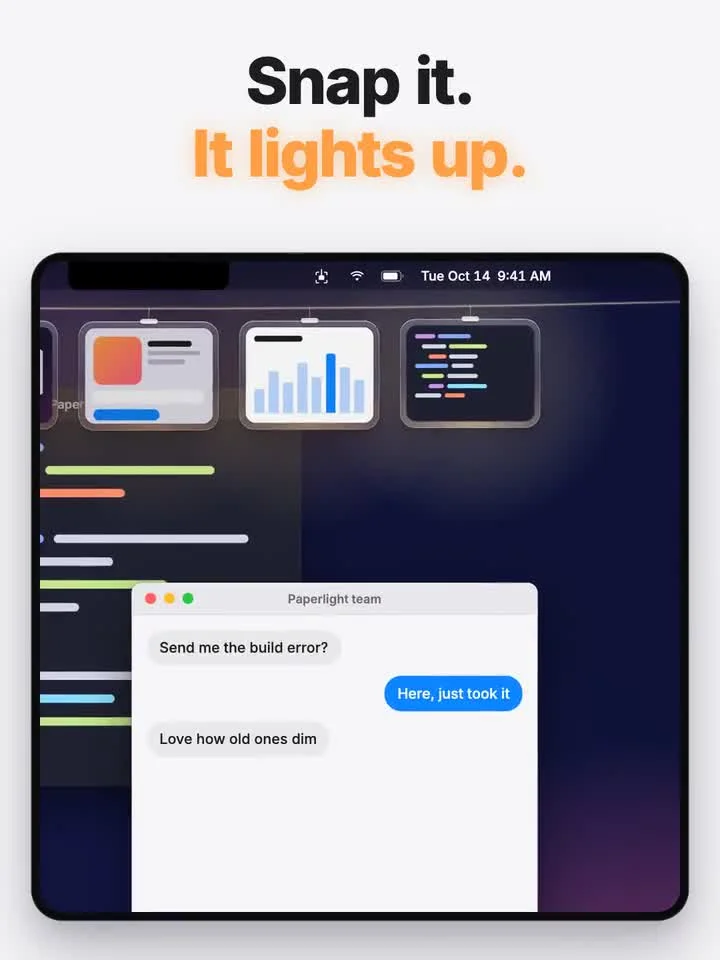
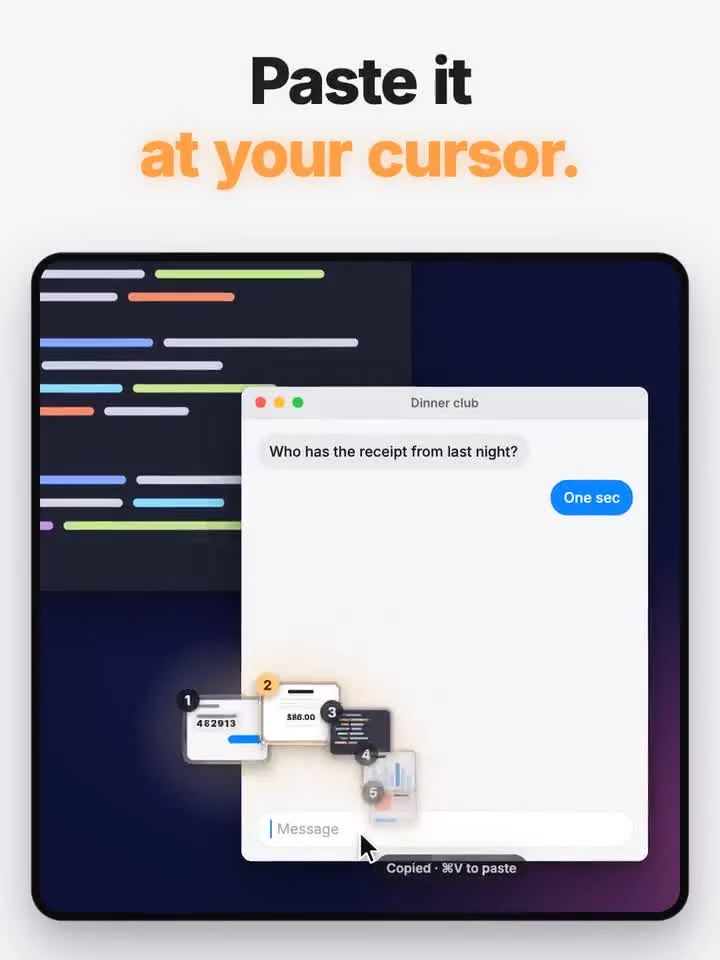
Images from Paperlight (product video). More on our Paperlight deal page.
What sets them apart
| Area | Paperlight | Shottr |
|---|---|---|
| Where captures live | A strip under the menu bar; old ones fade, pinned ones stay; floating panes over any app. | An editor window after each capture; pinned floating images. |
| Finding old shots | Ask a question in search; text, meaning and dates worked out on the Mac; captures also in Spotlight. | Files you save yourself. |
| Markup and measuring | A ruler, loupe and colour picker with contrast checks while a capture floats. | Full markup, pixelate and remove tools, screen ruler, overlays, beautiful backgrounds. |
| Text tools | Translation painted over the original, tables you can paste into a spreadsheet, code that keeps its indentation. | Text recognition and QR reading. |
| Capture types | Works with the standard macOS shortcuts; region watching and rules. | Scrolling screenshots of long pages and chats. |
| Requirements | Sonoma (macOS 14) or newer, on Intel or Apple-silicon Macs. | macOS 12 and up, optimised for Apple silicon. |
Privacy
Paperlight’s privacy page says text reading, search, translation and voice notes run on the Mac, with no accounts or analytics, and it lists every network connection the app makes. Shottr needs the internet to validate its licence and sends telemetry to help its developer find bugs.
Where Shottr is the stronger tool
- Its markup, pixelation and measuring tools are deeper.
- Scrolling screenshots capture whole web pages and chats.
- You can pay nothing and still use most of it.
Making the call
- Paperlight suits product managers, support staff and writers who take dozens of captures a day and want them findable without a messy Desktop.
- Paperlight also suits people who read screens in other languages and want translation laid over the original.
- Shottr suits designers and front-end developers who annotate and measure pixels.
Our take: Paperlight changes the whole screenshot habit, and $9.99 for four computers is a fair launch price. Keep Shottr too if you mark up and measure a lot; the two can work together.
Paperlight for $9.99 until December 3
The LAUNCH code is applied for you at checkout, and there is a 7-day refund. This page has no affiliate links.
Sources and notes, checked Nov 23, 2026
- Paperlight official site: menu bar strip, floating panes, paste at cursor, ask your screenshots, translate in place, tables and code, metadata scrub. Requirements: macOS 14 on Intel or Apple silicon. The maker describes $9.99 with code LAUNCH, applied at checkout until December 3, 2026, as an introductory price for its first two weeks; the usual price is $14.99. One payment covers up to two Macs, one Windows PC and one Linux PC. Checkout is handled by Polar.
- Paperlight’s privacy page lists on-device processing and its network connections.
- Shottr official site: features, macOS 12 and up, free use with occasional purchase reminders, licence activation and telemetry. Its Gumroad page is pay what you want with a $0 minimum. The site also mentions a Black Friday sale through Cyber Monday; Gumroad showed no fixed price.