At a glance
Cue Lifetime, Black Friday
Best forMac users who want dictation plus meetings and notes stored as files on the computer, and who would rather pay once
Wispr Flow Pro, annual
Best forPeople or teams who need the same dictation on Windows or a phone, shared seats, or admin and HIPAA options
Quick verdict
Cue keeps a local vault of meetings and notes and sells a $99 lifetime license through November 30, 2026.
Choose Wispr Flow when you need a multi-device or team seat, or HIPAA-ready admin controls Cue does not offer.
Both figures come from the price table below. A one-time licence is paid once, so its 3-year cost stays the same unless you buy an upgrade.
Cue is a Mac app that types what you say into the window you already have open, then keeps meetings and notes as ordinary files on the computer. Speech can stay on the Mac, or you can switch to a labeled cloud engine. The lifetime license is $99 once through November 30, 2026, instead of $199. Wispr Flow is a cloud dictation product for Mac, Windows, iPhone and Android, with a free plan and paid seats from $12 per user per month when you pay annually. Both put spoken words into other apps; Cue also stores a local vault of meetings and notes, while Flow is built around shared team seats.
Untracked links to both makers. We earn nothing from them.
Bills for year one and year three
| Plan | What you get | Year 1 | 3 years |
|---|---|---|---|
| Cue Lifetime, Black Friday | Unlimited meetings, notes and chat, every later update, all of your devices, and $10 of Cue Cloud credits to start. One payment through November 30, 2026. | $99 once | $99 |
| Cue Lifetime | The same purchase after November 30, when the price returns to $199. | $199 once | $199 |
| Cue Monthly | The same unlimited meetings, notes and chat, with $5 of Cue Cloud each month. Not part of the sale. Cancel any time. | $108 | $324 |
| Cue Free | Unlimited dictation, 25 meetings, 25 notes and 10 chats a day. No card. Mac only for now. | $0 | $0 |
| Wispr Flow Pro, annual | Unlimited dictations and Notetaker history, billed at $12 per user per month when paid yearly. | $144 | $432 |
| Wispr Flow Pro, monthly | The same Pro plan at $15 per user per month. | $180 | $540 |
| Wispr Flow Growth, annual | Pro plus basic admin controls, at $18 per user per month when paid yearly. | $216 | $648 |
| Wispr Flow Growth with unlimited Notetaker, annual | Growth plus unlimited Notetaker access, at $26 per user per month when paid yearly. | $312 | $936 |
| Wispr Flow Free | A free plan on Mac, Windows, iPhone and Android. | $0 | $0 |
Checked Nov 24, 2026 on cuevoice.ai and wisprflow.ai/pricing. US dollars. Cue prices are plus tax at checkout. Three-year totals repeat today’s prices. Wispr Flow also sells Growth at $23 per user per month, and Growth with unlimited Notetaker at $33 per user per month, when billed monthly. Enterprise is custom.
Worked example
Priya writes on a Mac, joins a few calls a week, and wants the words in Slack without a meeting bot on the line
She already dictates short replies and would like the transcript of a weekly client call saved next to her notes, as files she can open later without signing into someone else’s product.
With Cue
Priya holds a shortcut in Slack, talks, and the reply appears at the cursor. For the client call she starts capture in Cue, leaves the meeting in the app she already uses, and finishes with a transcript and notes in a folder on the Mac. Meeting capture is still in beta. She can stay on the free plan at first, then pay $99 once during the sale if she wants unlimited meetings, notes and chat.
With Wispr Flow
Flow also types what she says into Slack on the Mac, and it runs on her phone as well. If she wants a team plan later, Pro is $12 per user per month on annual billing, or $144 for the first year, and Growth adds admin controls. The archive lives in Flow’s product rather than as ordinary files on the Mac.
Priya’s three-year total: $99 once for Cue Lifetime in the sale, against $432 for one Wispr Flow Pro seat billed annually, or $0 if the free plan of either product is enough.
A look inside Cue
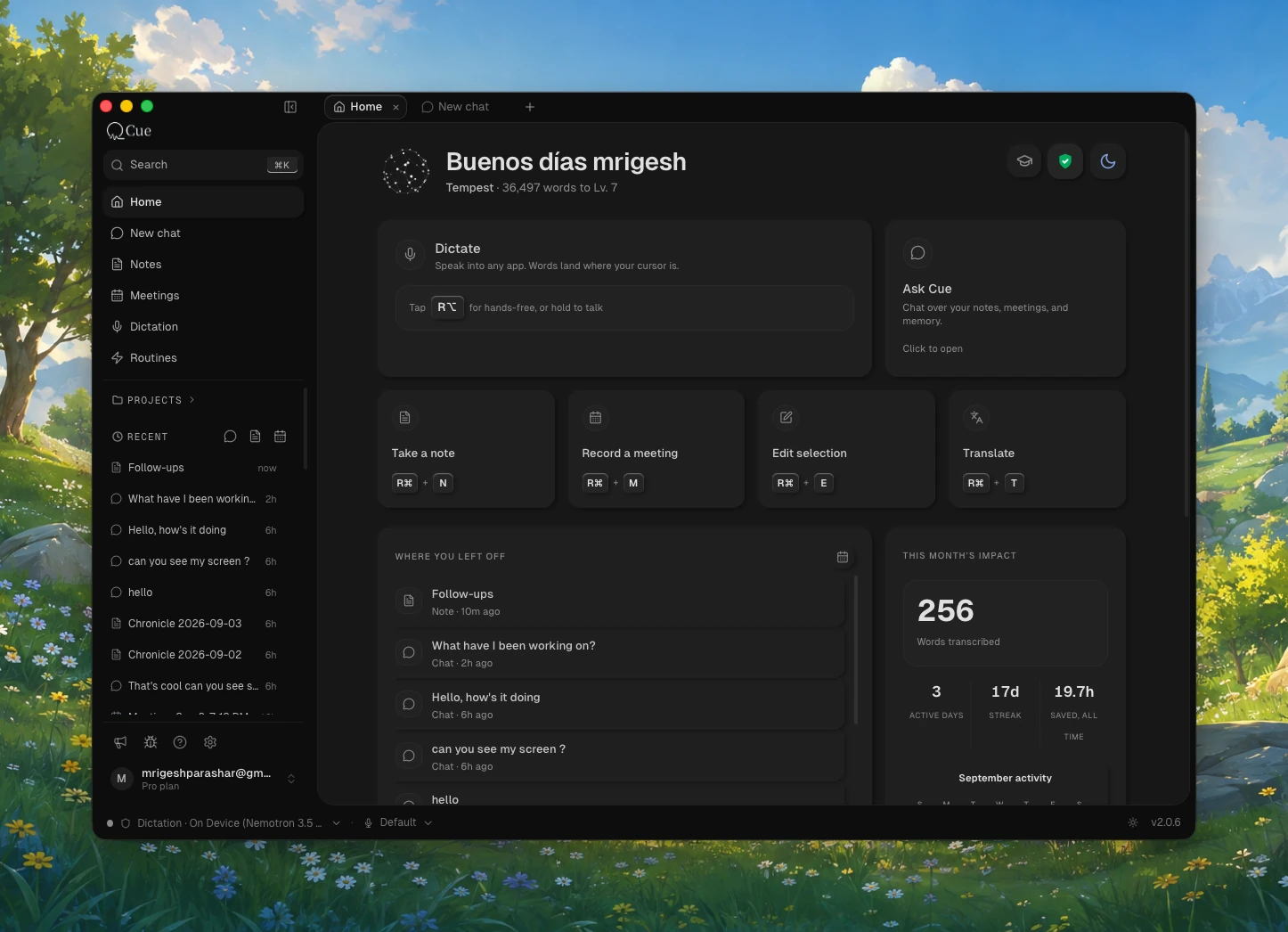
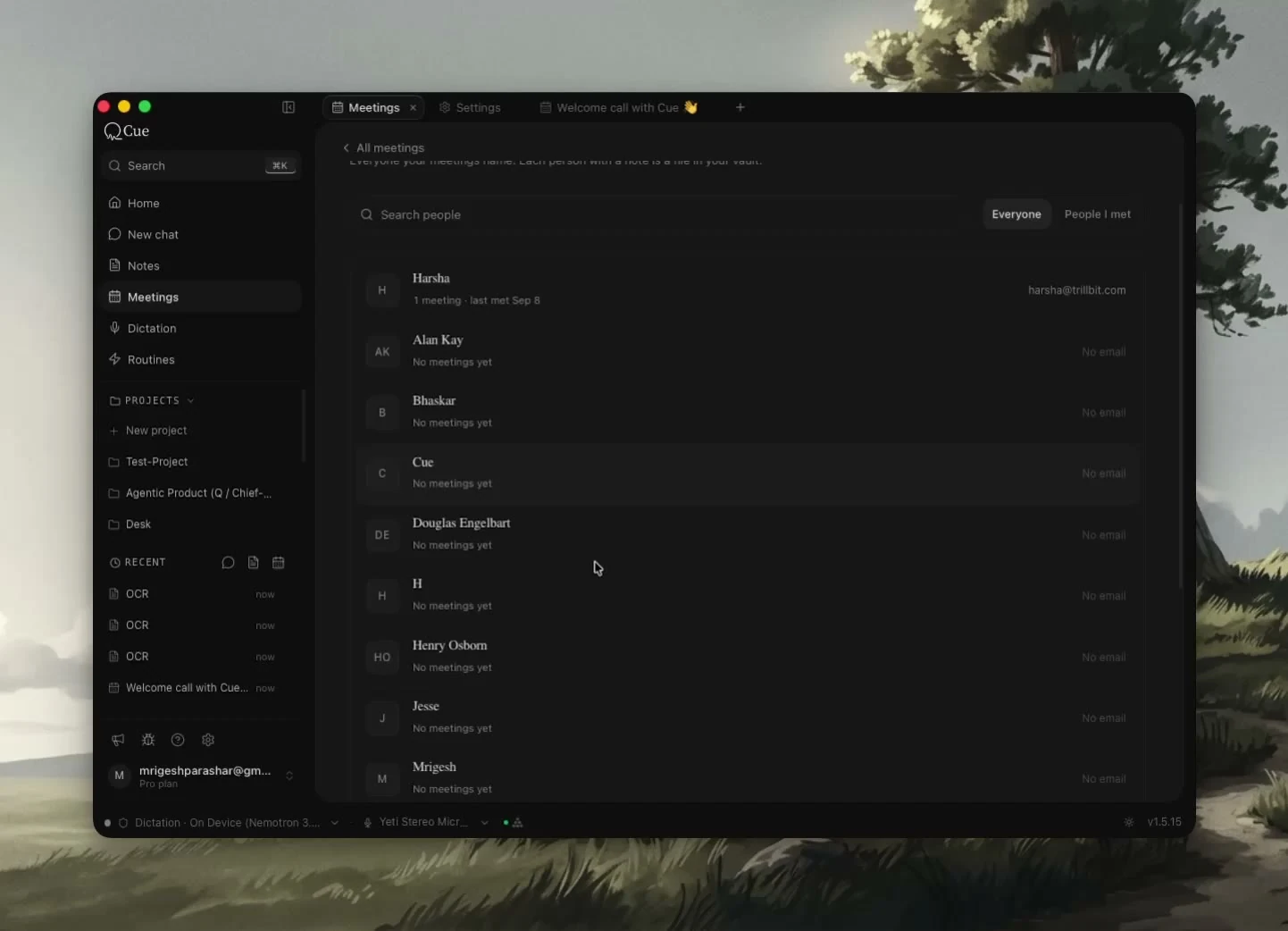
Screenshots from the Cue updates page (cuevoice.ai/updates). More on our Cue deal page.
Feature by feature
| Topic | Cue | Wispr Flow |
|---|---|---|
| Dictation | Speak into the Mac app that already has focus. Speech can be transcribed on the device or with a labeled cloud engine or your own keys. | Speak into apps on Mac, Windows, iPhone and Android. Plans add unlimited dictations on Pro. |
| Meetings and notes | Meetings can be captured without a meeting bot joining the call. Notes are kept as ordinary files on the Mac. Meeting capture and sourced chat are still in beta. | Notetaker history is part of Pro. Growth can add unlimited Notetaker access. |
| Asking across your work | You can ask questions across the notes and meetings in your local vault, or point Cue at your own Claude Code, Codex or API key. | Flow’s pricing page highlights sending meeting notes into Claude and ChatGPT on Pro. |
| Platforms | Mac only for now, on macOS 14 or later, with installers for Apple silicon and Intel. | Mac, Windows, iPhone and Android, per the pricing page. |
| Paying | Free, $9 a month, or $99 once through November 30, 2026 (then $199). Cue Cloud starts at $10 on the lifetime plan, or $5 each month on the monthly plan, and later top-ups start at $5. | Free, then Pro at $12 per user per month annually ($15 billed monthly). Growth is $18 annually or $23 monthly, or $26 / $33 with unlimited Notetaker. Enterprise is custom. |
Privacy
Cue is local-first. By default, speech is recognized on your Mac, and dictations, notes and meeting output stay there as files you can open outside the app. If you switch on a labeled cloud transcription or AI feature, audio or text leaves the device for that job; Cue’s privacy policy (updated November 8, 2026) says that content is not kept by Cue and is not used to train models. Usage analytics can be turned off in Settings. Wispr Flow’s pricing page says you can choose what stays on your device and delete it, and that Growth and Enterprise offer HIPAA-ready dictation and Notetaker with a signed BAA, plus SOC 2 Type II and ISO 27001 certification. Read each privacy policy before dictating confidential work.
Where Wispr Flow wins
- It runs on Windows, iPhone and Android as well as Mac, so a seat can follow you off the Mac.
- Growth and Enterprise add admin controls, and Enterprise can enforce device policies for a whole organization.
- HIPAA-ready dictation with a signed BAA is listed on Growth and Enterprise, which Cue does not advertise.
Who should pick which
- Cue Lifetime suits Mac users who want dictation plus a local archive of meetings and notes, and who would rather pay once through November 30 than keep a monthly seat.
- Cue Free suits someone who mainly needs unlimited dictation and can live with the cap of 25 meetings, 25 notes and 10 chats a day.
- Wispr Flow suits a person or team that needs the same dictation on a phone or Windows PC, shared seats, or admin and HIPAA options Cue does not offer.
Our take: Cue is the better fit when you work at a Mac and want the archive as files on the computer, and the $99 lifetime price is hard to beat for that job. Choose Wispr Flow when you need a multi-device or team seat.
Cue Lifetime for $99, through November 30, 2026
The $99 price is applied automatically on cuevoice.ai until November 30, then the lifetime license returns to $199. No code and no affiliate link here.
Sources and notes, checked Nov 24, 2026
- Cue homepage: official Black Friday lifetime price of $99 until 30 November, then $199; Free $0; Monthly $9 a month; lifetime includes unlimited meetings, notes and chat, $10 of Cue Cloud to start, and later updates; monthly includes $5 of Cue Cloud each month; top-ups from $5 that do not expire; local-first defaults described on the same page. The maker confirmed the sale terms for our listing.
- Cue download page: macOS 14 or later, separate Apple silicon and Intel installers, and meeting capture plus sourced chat still in beta.
- Cue privacy policy, last updated November 8, 2026: on-device speech by default; optional labeled cloud transcription and AI; content not kept or used for training; usage analytics can be switched off.
- Wispr Flow pricing: Free on Mac, Windows, iPhone and Android; Pro $12 per user per month annual or $15 monthly; Growth $18 annual or $23 monthly; Growth with unlimited Notetaker $26 annual or $33 monthly; Enterprise custom; annual billing is presented as a 20% discount; SOC 2 Type II, ISO 27001, and HIPAA-ready dictation with a signed BAA on Growth and Enterprise. Three-year totals repeat today’s prices. Taxes may be extra. We did not test either app.