Carbon Copy Cloner vs SuperDuper!
At a glance

Best forPeople who want filters, scripts, snapshot search and checks for backups of a whole Mac and its drives
SuperDuper! 4, registered
Best forPeople who want a plain clone with a free erase-then-copy mode and a simpler window
Quick verdict
Carbon Copy Cloner is the pick for control, snapshots and support, and it costs $39.99 until December 4.
SuperDuper! is the simpler pick, and its free mode is enough for a plain clone.
Both figures come from the price table below. A one-time license is paid once, so its 3-year cost stays the same unless you buy an upgrade.
Carbon Copy Cloner and SuperDuper! are the two names Mac users have trusted for cloning a disk for about two decades. Both are paid once and both let you try before buying, but the licenses differ: a Carbon Copy Cloner Personal and Household license covers every Mac in your home, while a SuperDuper! license is per user and covers that person’s own Macs. They differ in depth: Carbon Copy Cloner adds filters, scripts, snapshot search and cloud-file downloads, while SuperDuper! keeps the screen simple, gives away its erase-then-copy mode, and replaced copy scripts with plain-English Copy Rules.
Carbon Copy Cloner ↗ SuperDuper! 4 ↗
Both links go to the makers. We receive nothing if you buy.
What a new buyer pays for each
| Plan | What you get | Year 1 | 3 years |
|---|---|---|---|
| Carbon Copy Cloner 7, Cyber Week | Personal and Household license, every Mac in your household, non-commercial use. 20% off new purchases through December 4 at 9 pm Eastern. | $39.99 | $39.99 |
| Carbon Copy Cloner 7, regular | The same license after the sale. Upgrades, Pro and Corporate licenses are separate, and the sale skips them. | $49.99 | $49.99 |
| SuperDuper! 4, registered | Per user: Shirt Pocket’s buy page says one license covers that person’s own Macs, not a whole household. Unlocks scheduling, Smart Update and unattended copies. | $43.95 | $43.95 |
| SuperDuper! 4, unregistered | No time limit. Erase-then-copy backups only, including bootable copies. | $0 | $0 |
From carboncopycloner.com, its store page and download page, and shirtpocket.com on Nov 28, 2026. Three-year totals assume no paid major upgrade; CCC 7 was a paid upgrade from CCC 6 for older licenses, so a future version may cost extra for either tool.
Worked example
Marcus keeps a family photo library on an external drive and upgrades his Mac every few years
He wants one backup that is a full copy of his Mac, another for the photo drive that skips caches, and a reminder if either stops running. He is not a business and uses three household Macs.
With Carbon Copy Cloner
Marcus makes two tasks. The first copies the startup disk each night and keeps snapshots on the backup, so a deleted file can be pulled from last Tuesday. The second copies the photo drive with a filter that leaves out previews. CCC audits each run and sends a notice if a task has not run for a while. The household license covers all three Macs for $39.99 this week.
With SuperDuper!
Marcus would register SuperDuper! for $43.95, which covers his own Macs (Macs used by others in the home need their own license), and set up a scheduled Smart Update, which refreshes the copy instead of rewriting it. SuperDuper! wakes the Mac if needed and runs the copy overnight. For the photo drive he would use a Copy Rule, which reads in plain English and shows what it will do against real data. Erase-then-copy is free if he ever wants to try it first.
Their spend: $39.99 for Carbon Copy Cloner this week, or $43.95 for SuperDuper! 4, once each.
A look inside Carbon Copy Cloner
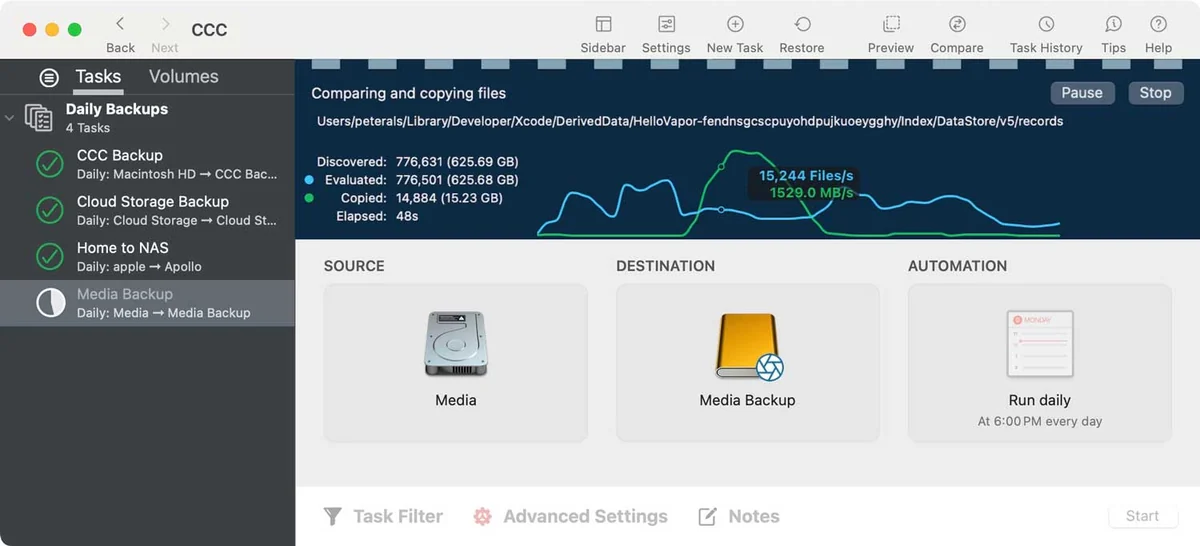
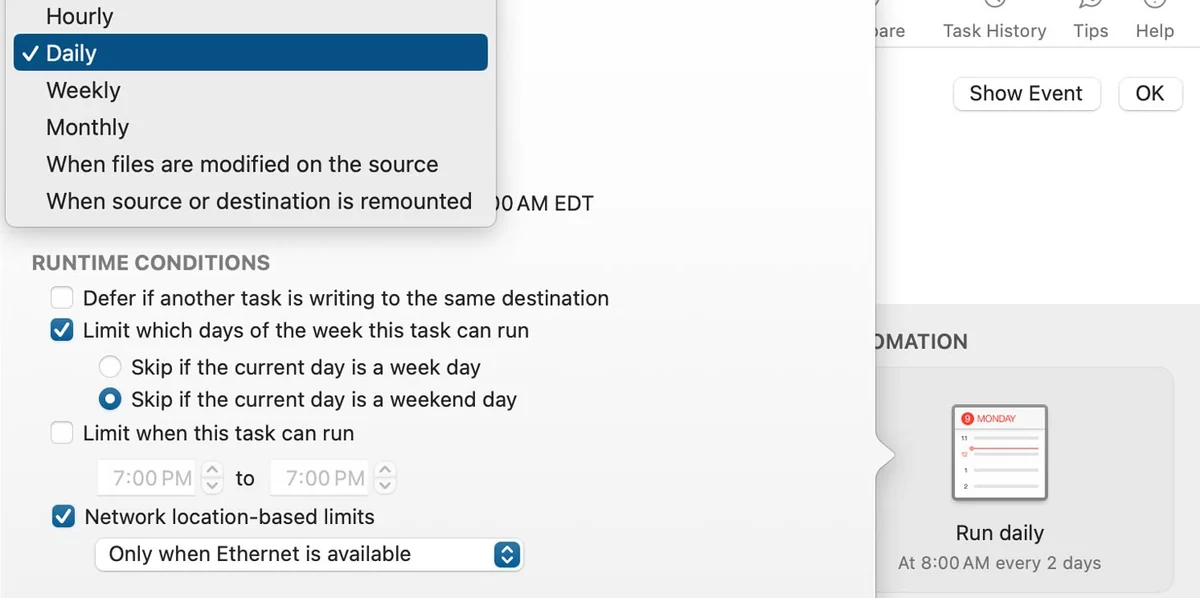
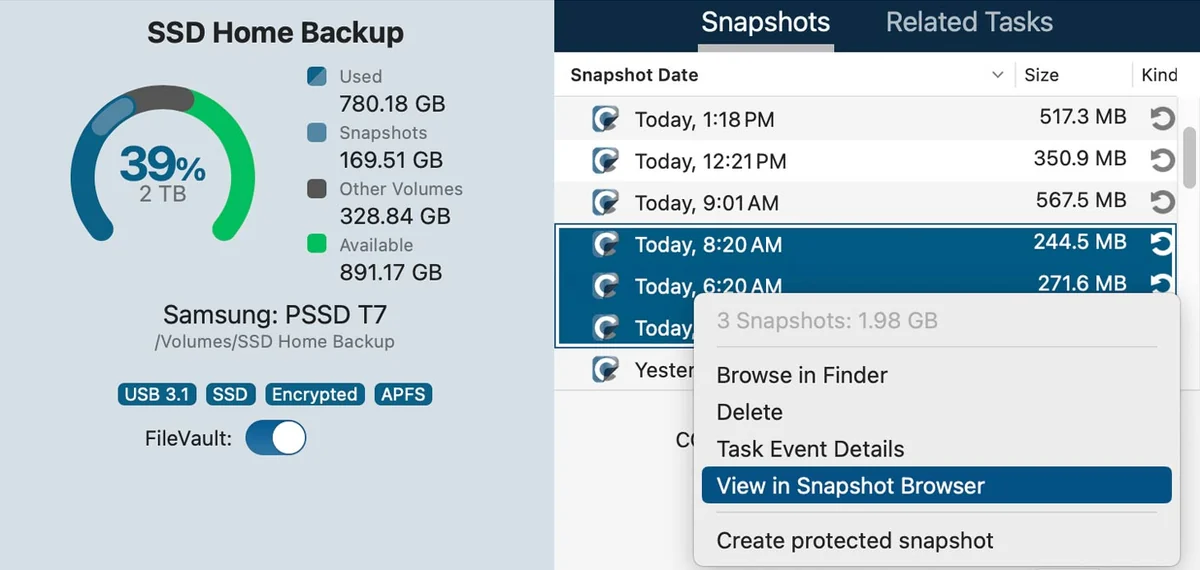
Images from carboncopycloner.com. More on our Carbon Copy Cloner deal page.
Side by side
| Topic | Carbon Copy Cloner | SuperDuper! |
|---|---|---|
| Copy modes | Backs up, copies one folder to another, restores a single file or recovers a whole Mac. It never copies files unnecessarily. | Erase-then-copy is free; Smart Update, and Turbo Smart Update where supported, come with a license. Backups are bootable on HFS+ and APFS. |
| Scheduling | Hourly, daily, weekly, monthly or when changes are detected, with day, hour and network limits such as Ethernet only. | Schedule copies for any time, including overnight; SuperDuper! wakes the Mac if needed and runs the copy. Needs the license. |
| Snapshots | Snapshots on the backup, kept read-only, with a Snapshot Browser that searches by file name across all of them. | Pages we read do not describe snapshots; its copies are real, bootable drives rather than archives. |
| Filtering and scripts | Task filters with a preview of what will be copied, plus shell scripts before and after a task, and chained tasks. | Copy Rules, a plain-English replacement for the older copy scripts; existing scripts are imported on first launch. |
| Cloud-only files | Can download iCloud, Google Drive, Dropbox, OneDrive and Box files for a local copy. | Pages we read do not describe it. |
| Checks | Three levels of file verification, audits of what changed, a backup health check and notices. | Pages we read do not describe a verification dashboard. |
| Requirements | CCC 7 needs macOS Ventura 13.1 or later; CCC 6 serves older systems. Intel and Apple silicon. | SuperDuper! 4 needs macOS 14 Sonoma or later, Intel and Apple silicon; SuperDuper! Classic covers systems back to macOS 10.2. |
| Trial and support | 30-day trial. Support comes from staff, not chatbots, with a knowledge base in seven languages. | Free trial download; erase-then-copy backups stay free, support included. |
Privacy
Carbon Copy Cloner says its maker has no access to your data and that CCC does not send it into the cloud, so your backups live on storage you own. Its privacy policy covers the website, newsletter and purchases. SuperDuper! writes straight to the drive you choose, with no disk image in between, and its guide argues that fewer layers mean a more reliable backup.
Where SuperDuper! wins
- Full erase-then-copy backups are free, with support included, so you can rely on it without paying.
- Its copies are real drives you can start the Mac from, and Copy Rules read in plain English.
- The license is per user: it covers that person’s own Macs, not every Mac in a household, and it supports Intel Macs on Sonoma and later.
Who should pick which
- Carbon Copy Cloner suits people who want filters, scripts, snapshots with search, and backups of cloud-only files, and who want a person to answer support questions.
- Carbon Copy Cloner is also the cheaper of the two for four more days, at $39.99 against $43.95.
- SuperDuper! suits people who want a bootable clone and would start with the free erase-then-copy mode.
- SuperDuper! also suits Mac owners on macOS 14 or later who prefer plain-English rules to task filters and shell scripts.
Our take: the $4 difference is small, so choose by how much control you want. If you like to filter, script and search snapshots, take Carbon Copy Cloner while the 20% sale runs. If you would rather start with a free bootable clone, try SuperDuper! first.
Try Carbon Copy Cloner for 30 days
We earn nothing from either link. The 20% sale ends Friday, December 4 at 9 pm Eastern.
Sources and notes, checked Nov 28, 2026
- Carbon Copy Cloner home page: Cyber Week Nov 27 to Dec 4, 20% off new purchases, upgrades, Pro and Corporate excluded, no code needed; scheduling, filters, snapshots, cloud-only files, verification, support, Household license, 30-day trial.
- Carbon Copy Cloner store: CCC 7 $49.99 and $39.99 Cyber Week Sale, Personal and Household License, requires macOS Ventura.
- Carbon Copy Cloner download page: CCC 7.2.2, Ventura 13.1 or later, CCC 6 for older systems, upgrade terms.
- SuperDuper! home page: $43.95, not a subscription, per user, for all personal Macs; unlocks scheduling, Smart Update and unattended copies; free for full erase backups on macOS 14 and later; upgrade discount for SuperDuper 3 buyers.
- SuperDuper! 4 FAQ: macOS 14 Sonoma or later, Apple silicon and Intel, bootable copies, Smart Update, Turbo, scheduling, Copy Rules, Classic back to macOS 10.2.
- The Cyber Week end time of Friday, December 4 at 9 pm Eastern is on the Carbon Copy Cloner home page. We tested neither app.