At a glance
ByteSweep Pro for Mac, 50% off
Best forCautious owners of small-SSD MacBooks who want each item explained and a week to change their mind
DaisyDisk
Best forConfident users who want to spot the biggest files on a map and delete them by hand
Quick verdict
ByteSweep tells you what is safe, leaves your photos and documents alone, and keeps a seven-day undo for anything you clear.
DaisyDisk costs less and its ring map is the quickest way to find one huge forgotten file.
Both figures come from the price table below. A one-time licence is paid once, so its 3-year cost stays the same unless you buy an upgrade.
ByteSweep and DaisyDisk take different routes to a fuller-feeling disk. ByteSweep sorts what it finds into three groups, ticks only the clearly safe ones such as caches and update leftovers, and keeps everything you clear in a restore point for seven days so Undo can bring it back. Pro adds a duplicate finder, a disk map and a folder tidy-up. DaisyDisk is the much-loved visual map: colourful rings that lead you to the biggest files so you can decide what goes. For people nervous about deleting the wrong thing, ByteSweep’s safety net is the stronger draw; for a fast visual hunt for large files, DaisyDisk is cheaper.
Links to each maker; we earn no commission.
Licence costs
| Licence | What you get | Year 1 | 3 years |
|---|---|---|---|
| ByteSweep Pro for Mac, 50% off | Every Mac feature, one computer, until December 31. | $15 once | $15 |
| ByteSweep Pro for Mac | Regular price, after a three-day free trial. | $29.99 once | $29.99 |
| ByteSweep for Mac, App Store | The cleaning essentials inside Apple’s sandbox. | $9.99 once | $9.99 |
| DaisyDisk | Lifetime licence with updates and fixes, after a free trial. | $9.99 once | $9.99 |
Checked Nov 23, 2026 on bytesweep.app/pricing, daisydiskapp.com and Apple’s US store (DaisyDisk id 411643860).
Worked example
Ruth’s 256 GB MacBook Air says the disk is almost full, and she is afraid of deleting something important
She has years of downloads, two old iPhone backups and photos she must not lose. She wants space back without guessing.
Ruth with ByteSweep
The scan changes nothing. ByteSweep shows caches and update leftovers ticked as safe, puts old downloads, duplicates and phone backups in a review group, and lists her photos and documents as untouched. She clears the safe group, then picks one old backup. A week later she can still undo it.
Ruth with DaisyDisk
The rings show at once that the backups and a few large videos take most of the space. She selects them and deletes them. It is quick, but the choices are hers and the deletion is permanent.
Ruth spends: $15 for ByteSweep Pro this year, or $9.99 for DaisyDisk.
A look inside ByteSweep
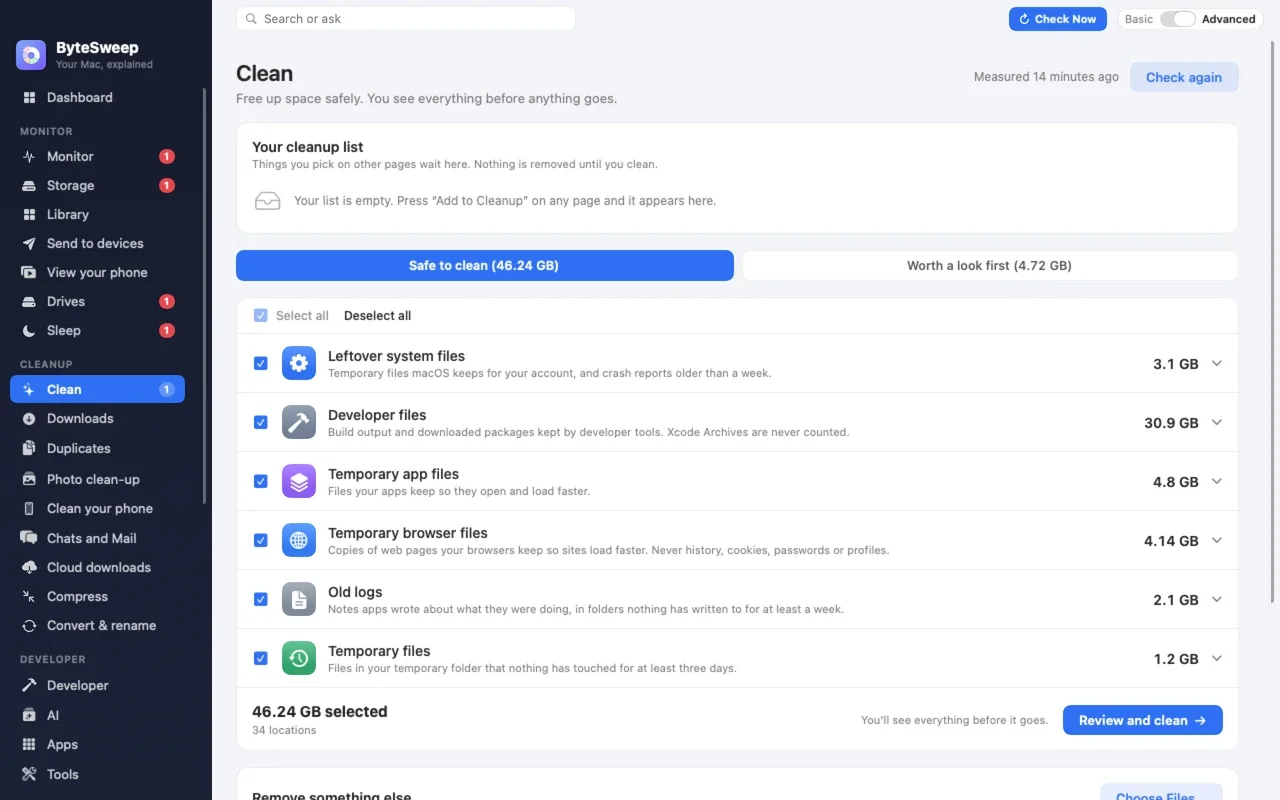
Image from ByteSweep's site, https://bytesweep.app/. More on our ByteSweep deal page.
Differences that matter
| Area | ByteSweep | DaisyDisk |
|---|---|---|
| Approach | Sorts findings into safe, review and keep; only the safe group is ticked. | A visual map of every folder; you choose what to delete. |
| Undo | Anything you clear can be brought back for seven days. | Files are deleted for good once you confirm. |
| Hidden space | Each group of System Data files is explained before you clear it. | Breaks down System Data, scans as administrator and finds snapshots. |
| Extra tools | Pro: duplicates, a disk map, folder tidying and transfers between your devices. | Scans Dropbox, Google Drive, OneDrive and Box, plus Space-bar previews. |
| Platforms | Versions for Windows, Linux and phones too, plus a free CLI; each sold separately. | Mac only. |
| Requirements | Runs on Intel and Apple-silicon Macs with macOS 14 or newer. | macOS 12 or newer, per its store listing. |
Privacy
ByteSweep needs no account; the scan runs locally and the licence key arrives by email. DaisyDisk also scans on your Mac and reaches cloud drives only when you connect them.
Reasons to choose DaisyDisk
- It costs less, and the App Store version is the same price.
- Its ring map is one of the fastest ways to spot a huge forgotten file.
- It can scan cloud storage and reveal macOS snapshots.
Bottom line
- ByteSweep suits cautious Mac owners on small SSDs who want a cleaner that explains each item and lets them undo for a week.
- ByteSweep also suits households with Macs, PCs and phones who want one tool and one way of working across them.
- DaisyDisk suits confident users who want to see the biggest files at a glance and delete them by hand.
Our take: ByteSweep is the gentler choice, and $15 until December 31 is fair for its undo and duplicate finder. If you know what you are looking for, DaisyDisk finds it for less.
ByteSweep Pro for $15
The discount is applied at checkout with no code. Nothing here is an affiliate link.
Sources and notes, checked Nov 23, 2026
- ByteSweep pricing: official page, $29.99 once per computer, three-day trial, 14-day refund, Mac App Store edition $9.99 (marked down from $14.99), free CLI. The maker confirmed in writing on November 22 that Pro for Mac is $15 at checkout until December 31, 2026. The pricing page still showed $29.99 and a test-mode label when we checked, so the $15 figure rests on that confirmation.
- ByteSweep official site: the three groups, read-only scan, seven-day restore point, Pro features, macOS 14 requirement, Apple silicon and Intel.
- DaisyDisk official site: $9.99 lifetime licence, free trial, scanning as administrator, System Data breakdown, snapshots, cloud scanning. The App Store listing shows $9.99, version 4.34.3, macOS 12 or later.
- We did not compare how much space each app recovers.