At a glance
Blackout licence, Black Friday
Best forMacBook owners who only want the built-in screen off next to an external monitor, with a safe reset
BetterDisplay Pro, sale
Best forPeople who want custom resolutions, extra brightness, virtual screens and full display control
Quick verdict
Pick Blackout if turning off the laptop screen is the only job and $5.40 with the code appeals.
Pick BetterDisplay if you will also tune resolutions, brightness and other display settings.
Both figures come from the price table below. A one-time licence is paid once, so its 3-year cost stays the same unless you buy an upgrade.
Blackout does one thing: it darkens a MacBook’s own panel while a separate monitor does the work, lid up, and turns it back on if anything goes wrong. BetterDisplay is a large display toolkit that can also disconnect screens, alongside custom resolutions, XDR brightness, virtual screens and much more. Until November 30, 2026, code BLACKFRIDAY40 takes 40% off Blackout’s $9 early-bird price.
Straight to Dev Metal’s Blackout site and to BetterDisplay’s. We earn nothing.
Blackout and BetterDisplay costs through year three
| Plan | What you get | Year 1 | 3 years |
|---|---|---|---|
| Blackout licence, Black Friday | The $9 early-bird licence with 40% off at checkout using BLACKFRIDAY40 or MACBASE40, until November 30, 2026. | $5.40 once | $5.40 |
| Blackout licence, early bird | One-time payment, all updates included, unlimited activations on your Macs. | $9 once | $9 |
| Blackout licence, regular | The struck-through regular price on the site. | $19 once | $19 |
| BetterDisplay Pro, sale | Pay once, 33% off, covering this major release with two or more years of updates. | $14.73 once | $14.73 |
| BetterDisplay Pro, regular | The same licence at its regular price. | $21.99 once | $21.99 |
| BetterDisplay free features | Keep using BetterDisplay’s no-cost features once the 14-day trial ends. | $0 | $0 |
Blackout prices from blackoutapp.io; BetterDisplay prices from betterdisplay.pro. Read November 27, 2026. $5.40 is our arithmetic: 40% off $9.
Worked example
Maya keeps her MacBook open beside a 27-inch monitor and wants the laptop screen dark
She types on the built-in keyboard and uses Touch ID, so closing the lid is not an option.
With Blackout
She flips the switch for the built-in Retina display. On Apple silicon it disappears from System Settings as a desktop, Touch ID keeps working, and unplugging the monitor, quitting or a crash brings the screen back. The licence is $5.40 with the code until November 30.
With BetterDisplay
She uses its disconnect and reconnect feature to switch the built-in display off, and gains far more: custom resolutions, extra XDR and HDR brightness, virtual screens, Picture in Picture and DDC control of the monitor. Pro is $14.73 during its sale.
Maya’s cost: $5.40 once for Blackout, or $14.73 once for BetterDisplay Pro.
A look inside Blackout
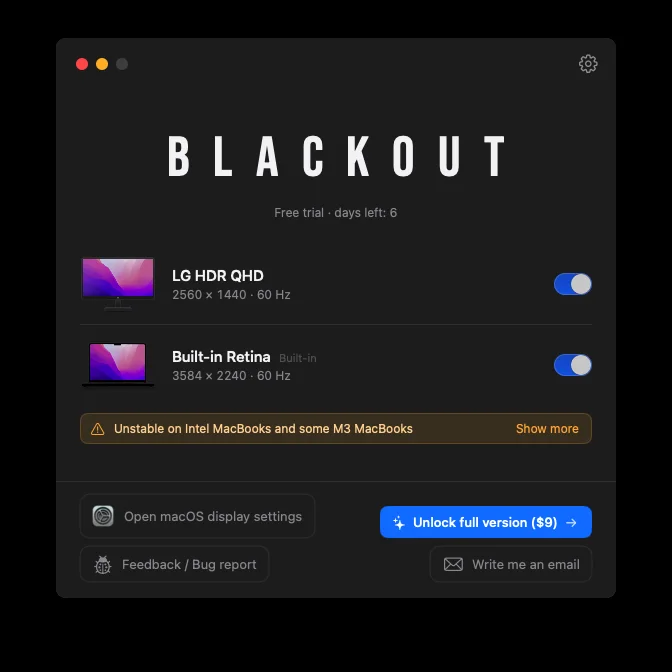
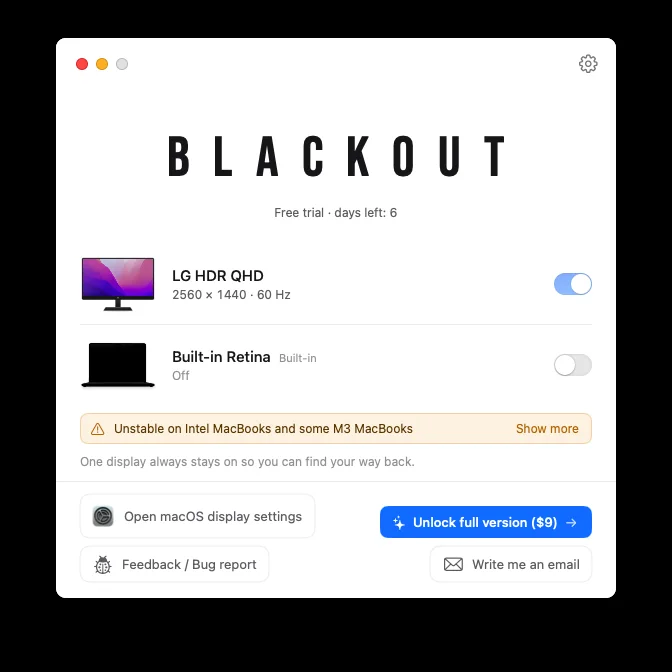
Screenshots from the Blackout press kit (blackoutapp.io/press). More on our Blackout deal page.
Feature by feature
| Topic | Blackout | BetterDisplay |
|---|---|---|
| Main job | Turn the built-in display, or any display, off and on from one window. | A full display manager; disconnecting screens is one of many tools. |
| Safety net | Automatic reset to all screens on; detects a cable unplug; screen returns at 80% brightness after quit, restart or crash. | Configuration protection for resolution, refresh rate, rotation and colour profile. |
| Touch ID | Keeps working with the display off, the maker says. | Not compared here. |
| Other tools | None; it stays a tiny menu bar app. | Custom resolutions, XDR/HDR brightness, virtual screens, PiP, EDID overrides, DDC, CLI and Shortcuts. |
| Requirements | macOS Sequoia onward on M-series and Intel; Intel Macs keep listing the internal panel in System Settings. | Apple silicon and Intel Macs. |
| Buying | Sold by the developer only; Apple’s store does not carry it. | Sold on betterdisplay.pro, with a free tier. |
Privacy and data
Neither app needs an account to try. Blackout is sold outside the App Store because it uses a hardware display API Apple does not allow there; the maker says it is signed with an Apple Developer account. BetterDisplay is downloaded from its site and GitHub. No data-collection terms appeared on either product page that we read.
Updates and platforms
Blackout is at version 0.3, 1.7 MB, and is new. BetterDisplay v5.3.3 was published on GitHub on November 23, 2026; the project has over 34,000 GitHub stars and sells Pro with at least two years of free updates.
Where BetterDisplay pulls ahead
- It does far more than switch a screen off: resolutions, brightness, virtual displays, PiP and DDC control.
- Over 34,000 GitHub stars and frequent releases.
- A free tier and a 14-day full trial.
Who should pick which
- Blackout suits MacBook owners who only want the built-in screen dark next to an external monitor, safely and cheaply.
- BetterDisplay suits people who want to tune every display setting, not just turn one screen off.
Our take: if switching off the laptop screen is the whole job, Blackout is the focused tool at $5.40 with the code. If you will use custom resolutions or extra brightness too, BetterDisplay is the better buy.
Blackout for $5.40 with BLACKFRIDAY40, until November 30
Type BLACKFRIDAY40 or MACBASE40 when paying on blackoutapp.io; a 7-day trial comes first if you want it.
Sources and notes, checked Nov 27, 2026
- Blackout website, read November 27, 2026: $19 struck, $9 early bird, “−40% Black Friday deal, use code BLACKFRIDAY40”; one-time payment, all updates, unlimited activations; free 7-day trial; Apple silicon (M1–M6) and Intel; macOS Sequoia and up; version 0.3, 1.7 MB; automatic reset, cable-unplug detection, Touch ID keeps working; Intel limitation in System Settings; not on the App Store.
- Maker confirmation: Christian Otterstein confirmed both codes, BLACKFRIDAY40 and MACBASE40, valid November 22 to 30, 2026, to IndieMarkdowns.
- BetterDisplay website, read November 27, 2026: “Get Pro - 33% Off”, $21.99 struck, $14.73 (€19.99 / €13.39); 14-day trial with all features, then Pro or free features; one-time purchase, at least 2 years of free updates; disconnect/reconnect displays on Apple silicon and Intel; custom resolutions, XDR/HDR brightness, virtual screens, PiP, EDID and DDC.
- BetterDisplay on GitHub: release v5.3.3 (November 23, 2026); about 34,700 stars.
- “Not compared here” means the page we used did not cover it. We did not test either app.