At a glance
BetterDisplay Pro, BFCM2026
Best forPeople who want virtual screens, extra brightness on an HDR or XDR panel, DDC, or scaled resolutions in one Mac utility, including on two personal machines
SwitchResX, single user
Best forPeople who mainly need custom resolutions, saved desktop layouts, or per-app mode changes on one Mac
Quick verdict
SwitchResX is the tighter tool when custom resolutions and saved layouts are the whole job.
Choose BetterDisplay Pro when virtual screens, XDR brightness or DDC are part of the daily setup, and use the BFCM2026 code before December 1 if that is when you buy.
Both figures come from the price table below. A one-time licence is paid once, so its 3-year cost stays the same unless you buy an upgrade.
BetterDisplay is a Mac menu-bar utility for scaled resolutions, virtual screens, XDR brightness, DDC, and a long list of other display tools, with a Pro license at US$21.99 — or $14.73 before tax with code BFCM2026 from November 26 to December 1, 2026. SwitchResX is the long-running resolution specialist: custom modes, saved desktop layouts, and automatic switches when an app launches, at €14 once for all 4.x updates. If you mainly want sharper scaled text and saved layouts, SwitchResX is the tighter, cheaper tool. If you also want virtual screens, extra brightness on an HDR panel, or hardware control from the menu bar, BetterDisplay is the broader kit, and it still has a usable free set of tools for non-business users after the 14-day trial.
Both links open the makers’ sites. We do not earn a commission on either one.
What each license costs
| Option | What you get | Year 1 | 3 years |
|---|---|---|---|
| BetterDisplay, free tools | Non-business users can keep the free feature set after the 14-day trial. Businesses need a Pro license to keep using the app at all, including the free tools. | $0 | $0 |
| BetterDisplay Pro, BFCM2026 | 33% off $21.99 is $14.73, before tax, with code BFCM2026 from November 26 to December 1, 2026. One-time Pro license for the current major version, at least two years of updates, usable on up to two personal Macs. | $14.73 once | $14.73 |
| BetterDisplay Pro | The same license at the usual US$21.99 / €19.99 price (Paddle may add tax). A later major version after the two-year window may need a new or upgrade license; no upgrade price is published here, so the three-year total assumes you do not buy one. | $21.99 once | $21.99 |
| SwitchResX, single user | A one-computer license at €14, bought on the FastSpring store after a 10-day full trial. Updates to every future 4.x release are included. Quantity discounts start at two licenses; a site license is €225. | €14 once | €14 |
Prices from betterdisplay.pro and madrau.com/download, read November 24, 2026. Currencies are shown as each maker publishes them; taxes can change the total at checkout.
Worked example
Maya runs a 27-inch 1440p display next to a MacBook and wants text she can actually read
macOS offers a size that looks too small and a size that looks soft. Maya also wants brightness keys to work on the external panel, and an extra desktop when she records a window.
With BetterDisplay
Maya tries the 14-day trial, sets a HiDPI mode the Displays pane did not list, and judges the text on the real desktop. The menu bar can raise the panel’s brightness when the monitor talks DDC. If she needs a virtual 16:9 screen for a recording, she creates it in Settings. If she wants Pro after the trial, the sale price is $14.73 before tax with BFCM2026, or $21.99 after December 1, on up to two of her own Macs.
With SwitchResX
Maya uses the 10-day trial to install a custom resolution and save a desktop layout so icons go back to their places when she reconnects the panel. She can name that mode something memorable and have it selected when a particular app launches. The license is €14 for one Mac, with updates through the 4.x line. SwitchResX will not add the virtual screen or the XDR brightness tools she also wanted.
What Maya pays: If the only gap is a usable scaled size and a saved layout, SwitchResX at €14 is the smaller bill. If she wants the broader kit, BetterDisplay Pro at $14.73 before tax during the sale (or $21.99 after it) covers the extra tools on two Macs.
A look inside BetterDisplay
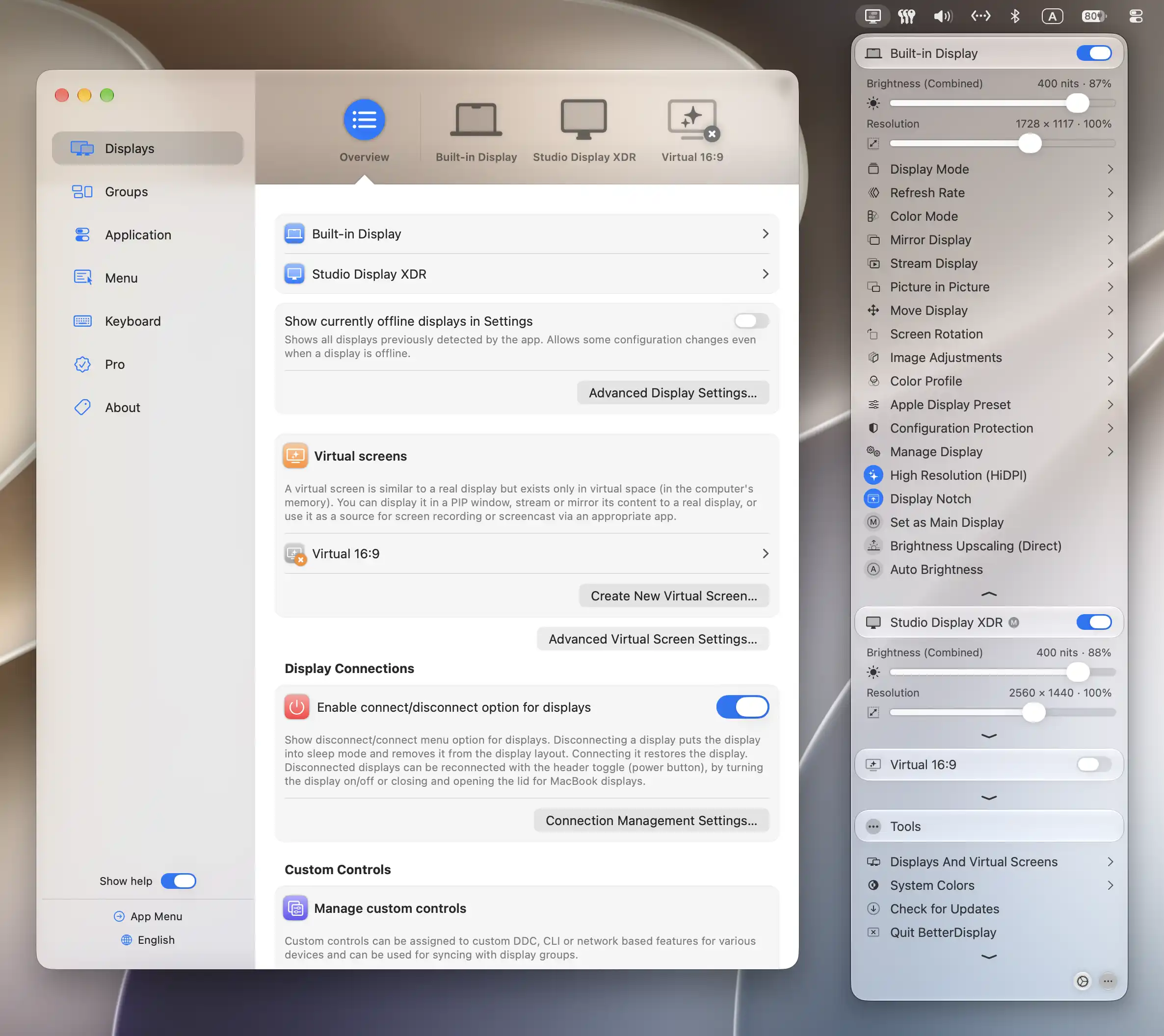
App screenshot from betterdisplay.pro. More on our BetterDisplay deal page.
Side by side
| Topic | BetterDisplay | SwitchResX |
|---|---|---|
| Main job | Scaled resolutions, virtual screens, XDR/HDR extra brightness, Picture in Picture, soft disconnect, EDID and configuration overrides, DDC, color modes, sync and layout protection. | Custom resolutions, saved desktop layouts, resolution changes when an app launches, named modes, a finer icon grid, and turning screens on or off (including clamshell use). |
| Free use after the trial | Non-business users can keep the free tools. Visual arrangement is free; some advanced grid-snap options and layout protection need Pro. Automation hooks are free to open, but actions that drive Pro features still need Pro. | The trial is fully functional for 10 days. After that, preferences no longer load or save until you register. |
| License scope | A personal Pro license covers up to two personally owned Macs, or two family Macs, as alternative uses of the same allowance. | A single-user license covers one computer. Volume prices drop from two licenses; a site license covers an organization at €225. |
| Platforms | Mac only, Apple silicon and Intel. Current v5.x is listed for macOS 26 Tahoe and macOS 27 Golden Gate. Older builds remain available back through Mojave. | Optimized for Intel and Apple silicon. On Apple silicon, most custom-resolution features need macOS 13 Ventura or later. Current version on the site is 4.15.0. |
| Updates | New purchases include at least two years of updates, including major versions released in that period. The license stays perpetual for every major version in that entitlement. | Registering entitles you to updates to all future SwitchResX 4.x versions. It is not a subscription. |
| Trial | 14 days, every feature unlocked, no card required to start using the app. | 10 days, fully functional. After that, settings no longer load or save until you enter a registration code. |
Privacy and updates
BetterDisplay handles purchases and license checks through Paddle, can send crash reports through Sentry, and pulls update metadata from GitHub with Sparkle. Crash reporting, licensing, and automatic update checks can be turned off in Application settings; turning licensing off limits the app to free features. Kodeon Software says it does not build marketing lists from app use or keep an app-usage tracking database. SwitchResX’s website says it does not use cookies and does not collect tracking, analytics, or marketing data; the only information it collects is what you type into the contact form, which is emailed to the site owner and is not stored in a database. The site does not publish a separate in-app privacy policy in the pages we read, so treat that as a fact about the website, not about every part of the app.
What users report
On r/macapps, a long-term BetterDisplay Pro write-up from April 2026 describes sharper text on third-party monitors once custom resolutions and HiDPI scaling are set, plus keyboard brightness control, and also a learning curve: the interface is “not the simplest,” and the terminology can be confusing until the right settings stick. In a January 2025 thread about SwitchResX, one commenter who had used SwitchResX wrote that they later found BetterDisplay “far, far superior in every regard” and had uninstalled SwitchResX. Those are individual reports, not a survey, and both apps still have people who only want a smaller resolution tool.
Where SwitchResX wins
- It costs less at the usual prices: €14 for one Mac, with updates through the whole 4.x line, against US$21.99 (or $14.73 before tax only during the November 26–December 1 sale).
- It is built around the jobs people actually buy it for: custom resolutions, saved layouts, named modes, and changing resolution when an app launches.
- The 10-day trial is the complete app, and the license is a simple one-computer registration, not a two-Mac personal allowance with a separate business rule.
- If you do not want virtual screens, XDR brightness, DDC, or a large Settings window, you are not paying for a toolkit you will ignore.
Who should pick which
- SwitchResX suits someone who wants custom resolutions, saved layouts, or per-app mode changes on one Mac, and who is happy with a focused tool at €14.
- BetterDisplay’s free tools suit a non-business user who can get what they need without Pro, after trying the 14-day trial.
- BetterDisplay Pro suits someone who also wants virtual screens, extra brightness on an HDR or XDR panel, DDC, color modes, or soft disconnect, especially if two personal Macs should share one license.
Our take: start with whichever trial matches the job. Pay €14 for SwitchResX if resolution control is the whole story. Pay for BetterDisplay Pro when the extra display tools are part of the daily setup, and use BFCM2026 before December 1 if that is when you decide.
Get BetterDisplay or SwitchResX
We do not earn a commission on either link. Confirm the price, tax and code at checkout before you pay.
Sources and notes, checked November 24, 2026
- BetterDisplay homepage (English and zh-hans): official Black Friday & Cyber Monday 2026 offer, 33% off, code BFCM2026, November 26 to December 1, 2026, one-time purchase, at least two years of free updates, yours forever. Regular Pro price US$21.99 / €19.99, tax may apply, 14-day trial, current v5.x for macOS 26 and 27, older builds listed for earlier systems. Footnotes: visual arrangement is free; some advanced grid-snap options and layout protection need Pro; automation interfaces are free to access, operations that control Pro features still need Pro.
- Getting a Pro license: advertised price US$21.99 / €19.99, Paddle checkout, taxes and exchange rates can change the total, at least two years of updates including major versions in that period, perpetual for the versions it covers, no subscription. Student App Centre currently offers a separate 25% membership discount; that membership is not the BFCM2026 code and renews as a paid yearly plan unless canceled, so it is not treated as a simple education price in the table above. 33% of $21.99 is $14.73, before tax.
- License terms, refunds and privacy, last revised November 5, 2026: developed by Kodeon Software Limited; personal Pro license on up to two Macs; businesses need a Pro license after the trial even for free features; Paddle and Sentry are named in the privacy section; crash reporting, licensing and automatic update checks can be disabled; the developer does not build marketing lists from app use. Support is through GitHub Issues and Discussions, Discord, and the Contact section on betterdisplay.pro, on a voluntary basis.
- SwitchResX homepage and download / register page: current version 4.15.0, 10-day fully functional trial, lifetime license at 14 € on the FastSpring store, one computer, free updates to all future 4.x versions, not a subscription. Quantity prices and a €225 site license are listed on the store page.
- SwitchResX features: independent control of more than one screen, saved desktop layouts, disable or activate screens (including clamshell use), link screens to shortcuts, AppleScript and application launches, custom resolutions, renamed modes, a finer desktop grid. Optimized for Intel and Apple silicon.
- Custom resolutions usage: on Apple silicon, use macOS 13.0 Ventura or later to get most of these features.
- SwitchResX privacy policy: the website does not use cookies and does not collect tracking, analytics, or marketing data; contact-form messages are emailed to the site owner and are not stored in a database. Hosted by OVH (France).
- User reports (framed as what those writers said, not as our measurements): BetterDisplay Pro: Long Term Review on r/macapps (April 27, 2026); SwitchResX - Granular Resolution Control on r/macapps (January 3, 2025), including the comment by u/Travel69.
- Three-year totals repeat today’s purchase price and assume no later paid upgrade is bought. Taxes may be extra. Lunar (lunar.fyi, Pro at $23 once) was considered as the other well-known Mac display utility and set aside: it is built around brightness, DDC and adaptive modes, not the custom-resolution job that SwitchResX and BetterDisplay share most directly.