AlDente vs macOS Optimized Battery Charging
At a glance

AlDente Pro, lifetime, regular
Best forThe Pro-only controls: automatic discharge, clamshell discharge, heat protection, scheduling
macOS Optimized Battery Charging
Best forStopping a plugged-in MacBook sitting at 100% all day, at no cost
Quick verdict
If you only want to stop a plugged-in MacBook sitting at 100% all day, start with the free tools.
AlDente Pro is worth paying for only if you need the extra Pro-only controls on the official pricing page.
Figures from the official price table below; 3-year totals are list price × 3 (lifetime and one-time licences are one payment).
If you only want to stop a plugged-in MacBook sitting at 100% all day, start with the free tools. Apple’s Optimized Battery Charging is built into macOS 11 and later, at no cost. On a Mac with Apple silicon running macOS Tahoe 26.4 or later, Apple also offers a free Charge Limit you can set between 80% and 100%. AlDente’s official free plan adds a charge limiter, and a discharge feature, without a purchase. AlDente Pro is worth paying for only if you need the extra Pro-only controls on the official pricing page — automatic discharge, clamshell discharge, heat protection, scheduling, and the rest of that list. A lifetime license is $24.99; a yearly subscription is $13.99. During the official Black Week sale, 30% off applies automatically until 1 December 2026, 9:00 CET, and on the yearly plan that 30% is for the first year only.
Get AlDente ↗(affiliate link)
Prices, plans and features below come from official AppHouseKitchen and Apple pages checked on Nov 20, 2026. US dollar amounts for AlDente Pro are from the Paddle prices API that the official pricing page itself calls, with customer country set to US: $24.99 for the lifetime license and $13.99 a year for the subscription, tax included. The euro figures printed in the raw HTML (23,99 € and 11,49 €) are the page’s fallback before that lookup. Apple’s features are free. The button on this page goes to AlDente through our affiliate link. Affiliate link: IndieMarkdowns may earn a commission if you buy through this link, at no extra cost to you.
What you pay, and what you do not
The honest value comparison is not “paid app versus paid app.” Apple’s tools cost $0 in year 1 and $0 over three years. AlDente Free is also $0. You only start paying if you buy AlDente Pro. At the official US list prices, a year of Pro is $13.99 and three years would be $41.97 if that price stays the same. The $24.99 lifetime license is already less than two years of the yearly plan ($27.98). During the official sale, 30% off $24.99 is $17.49, which matches the dollar amount AppHouseKitchen has published for the lifetime license. 30% off $13.99 is $9.79 by our arithmetic; the official banner does not print the discounted yearly dollar amount, and it states that on the yearly plan the discount applies to the first year.
| Option (official, checked Nov 20, 2026) | What it is, as listed | Year 1 | Years 1 to 3 combined |
|---|---|---|---|
| macOS Optimized Battery Charging | Built into macOS Big Sur 11 or later. Free. Learns your charging routine and can delay charging past 80% when it predicts the Mac will stay plugged in. Official steps are in System Settings → Battery → Charging. | $0 | $0 |
| macOS Charge Limit | Built in, free, on macOS Tahoe 26.4 or later with Apple silicon. You set a limit between 80% and 100%. The Mac charges to within a few percentage points of that limit. | $0 | $0 |
| AlDente Free | Official free download. The pricing-page feature list marks Charge Limiter and Discharge as included, and marks the rest of the Pro list as not included. Notarized by Apple. macOS 12 Monterey through 27 Golden Gate. | $0 | $0 |
| AlDente Pro, yearly, regular | $13.99 a year, billed annually, cancel anytime, renews automatically, per the official US Paddle price and the pricing-page wording. | $13.99 | $41.97 |
| AlDente Pro, yearly, official 30% first year | Official banner: 30% off until 1 December, 9:00 CET, applied automatically at checkout; “On the yearly plan, the discount applies to the first year.” 30% off $13.99 is $9.79, which is our arithmetic. Years 2 and 3 are shown at the regular $13.99. | $9.79 | $37.77 |
| AlDente Pro, lifetime, regular | $24.99 one-time, official US Paddle price, tax included. | $24.99 | $24.99 |
| AlDente Pro, lifetime, official 30% sale | 30% off $24.99 is $17.49. Official sale window: until 1 December 2026, 9:00 CET, which is 00:00 Pacific Time on Nov 30, 2026. The same banner’s script starts the window at 25 November 2026, 08:00 UTC, which is midnight Pacific Time on Nov 25. | $17.49 | $17.49 |
Sources: AlDente official pricing and the Paddle prices API that page calls for products 647568 (lifetime) and 647748 (yearly), checked Nov 20, 2026; Apple’s “About Optimized Battery Charging and Charge Limit on Mac”, published April 6, 2026. Three-year totals for the yearly plan multiply the official annual price, except the sale row, which uses one discounted first year plus two regular years. They are not a three-year plan AlDente sells. AlDente Pro is also offered via Setapp, with a 7-day free trial on Setapp’s monthly membership; we are not restating Setapp’s own price here.
What you do not pay for if Apple’s free tools or AlDente Free are enough: $13.99 a year or $24.99 once. What you do not get for $0 from Apple: the Pro-only AlDente list (automatic discharge, clamshell discharge, heat protection, sailing mode, MagSafe LED control, top up, calibration, scheduling, sleep-related charging controls, Low Power Mode control, Apple Shortcuts, customizable menu bar and popover, and email support). What you do not get from AlDente: a Windows or iPhone app. Official compatibility is MacBooks, Apple silicon and Intel, on macOS 12 through 27. Apple Charge Limit is limited to recent Apple silicon Macs on macOS 26.4 or later.
Illustrative scenario — not a real customer
A freelancer whose MacBook stays plugged in at a desk most workdays
This is a worked example so the prices are easier to judge. It is not a test we ran and not a person we interviewed. Every step uses a feature the official pages describe. We do not invent battery-health percentages, how many months a battery lasts, or a result this person got.
Sam is a freelance designer with a 14-inch MacBook Pro on a desk, plugged in for most of a workday, and sometimes taken to client meetings. Sam wants the battery not held at a full charge all day, and a way to charge to 100% before leaving. We look at three official paths: Apple’s free settings, AlDente Free, and AlDente Pro.
In macOS, using only official Apple steps
- Open System Settings, click Battery in the sidebar, then click the info button next to Charging (or Battery Health), as Apple’s support article describes for macOS Ventura 13 or later.
- Turn Optimized Battery Charging on. Official description: it uses on-device machine learning to learn the daily charging routine and “can delay charging past 80% in certain situations,” such as when it predicts the Mac will stay on power for an extended time. It “aims to ensure that your Mac is fully charged by the time it expects you to need a full charge.” When a charge past 80% is delayed, the battery menu shows “Charging On Hold.” To reach 100% sooner, Apple’s article says to choose “Charge to Full Now.”
- If the Mac has Apple silicon and is running macOS Tahoe 26.4 or later, set a Charge Limit between 80% and 100% on that same Charging info screen. Official behavior: the Mac charges to within a few percentage points of the limit, then shows “Charged to [%] Limit.” If the level drops more than 5% while plugged in, charging resumes up to the limit. “Charge to Full Now” is also listed for this feature.
- Apple also notes that, with either feature, the Mac “will occasionally charge to 100% to maintain accurate battery state-of-charge estimates.” We do not add a schedule or a result on top of that.
Official cost: $0 in year 1 and $0 over three years.
In AlDente Free, using only listed tools
- Download AlDente from the official site. The free plan is listed as a free download, notarized by Apple, on macOS 12 through 27.
- Use the Charge Limiter, which the official Free column marks as included, to set a cap rather than relying only on Apple’s learned routine. Official Free also includes Discharge. We do not invent a particular percentage or a time to discharge.
- Do not count on the Pro-only list. The official Free column marks Automatic Discharge, Discharge in Clamshell Mode, Heat Protection, Sailing Mode, Control MagSafe LED, Top Up, Calibration Mode, Schedule, Sleep Control, Stop Charging when Sleeping, Low Power Mode Control, Apple Shortcuts Support, customizable menu bar icons and popover, email support, and “Full License” as not included.
Official cost: $0 in year 1 and $0 over three years.
In AlDente Pro, using only listed tools
- Buy the yearly or lifetime Pro license, or wait for the official 30% Black Week window if it is still running. The yearly plan is “Billed annually. Cancel anytime. Renews automatically.”
- Keep the charge limiter, and use any of the Pro-only controls that match the desk-and-meeting pattern — for example Schedule, Automatic Discharge, Discharge in Clamshell Mode, or Heat Protection, which the official Pro columns mark as included. We do not invent what those modes do beyond their official names, and we do not invent a battery-health outcome.
- If Sam uses Apple Shortcuts, that support is listed for Pro, not for Free.
Official cost, at the US prices we checked: $13.99 in year 1 and $41.97 over three years on the regular yearly plan, or $24.99 once for lifetime. During the official sale: $17.49 once for lifetime, or about $9.79 in year 1 on yearly if 30% off $13.99 is applied, then $13.99 in later years ($37.77 over three years by that arithmetic).
What the numbers say for this scenario: if Sam’s Mac already has Apple’s Charge Limit, or if Optimized Battery Charging plus AlDente Free is enough, the better value is $0. Paying for AlDente Pro only makes sense if Sam needs a listed Pro-only control, or a manual limiter on a Mac that does not officially get Charge Limit (Intel Macs, or macOS older than 26.4). The lifetime license, especially at $17.49 during the official sale, is the cheaper Pro path if those extras are needed for more than about two years at the regular yearly price.
A look inside AlDente Pro
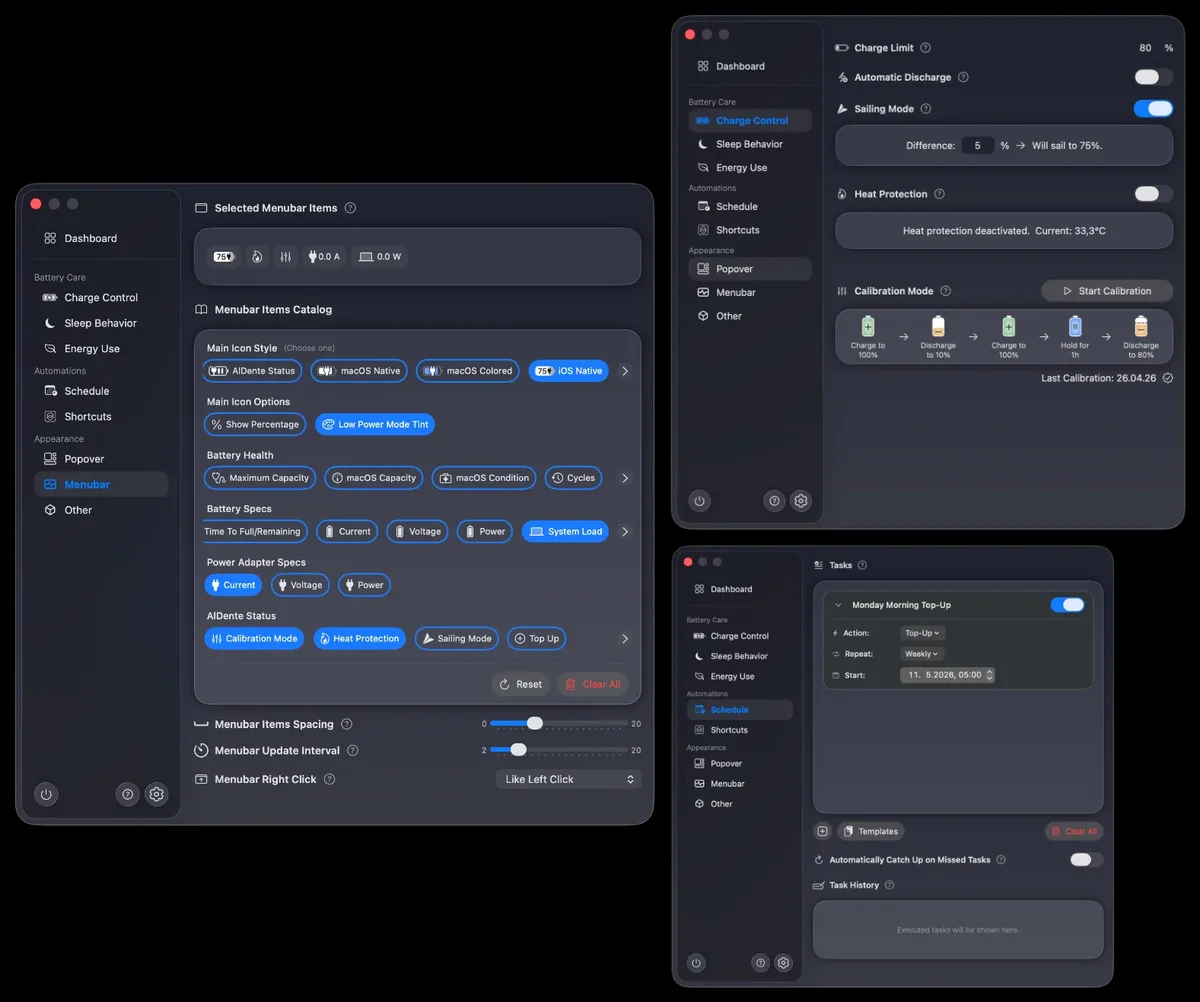
Images from AlDente's official site. More on our AlDente Pro deal page.
Where the built-in tools win, stated plainly
- Price. Apple’s Optimized Battery Charging and, where available, Charge Limit are free. AlDente Free is also free. Pro is a paid upgrade.
- No extra app, on a supported Mac. The official Apple path lives in System Settings. There is nothing to license, renew, or uninstall.
- Charge Limit is now an official Apple setting on macOS Tahoe 26.4 or later with Apple silicon. That overlaps the core “set a cap so a docked MacBook is not held at 100%” job that people have used AlDente for. If that is all Sam needs, and the Mac qualifies, Apple already ships it.
- Optimized Battery Charging is automatic. It is not a cap you type in, except when you also set Charge Limit. Apple designed it to learn a routine and delay past 80% only in some situations, then aim for a full charge when you are expected to need one. That may be enough, or it may be less predictable than a fixed limiter. We do not claim one lasts longer than the other; Apple and AppHouseKitchen do not publish a head-to-head battery-life test we can cite.
Feature by feature, from official pages
| Topic | AlDente, as listed on apphousekitchen.com (checked Nov 20, 2026) | Apple, as listed on support.apple.com/en-us/102338 (published April 6, 2026) |
|---|---|---|
| Charge cap you set yourself | Charge Limiter is marked included on Free, Pro yearly, Pro lifetime, and the Setapp column. | Charge Limit: choose a setting between 80% and 100%. Requires macOS Tahoe 26.4 or later and Apple silicon. Not listed for Intel Macs or older macOS. |
| Automatic delay past 80% | Not described in those words on the pricing page. Pro lists Schedule and Automatic Discharge as included; we do not equate those with Apple’s learned routine. | Optimized Battery Charging, macOS 11 or later, free. Can delay charging past 80% when it predicts the Mac will stay on power. “Charging On Hold” appears in the battery menu. |
| Charge to 100% on demand | Pro lists Top Up as included; Free marks it not included. We do not add behavior the pricing page does not spell out. | “Charge to Full Now” from the battery status menu, for both Optimized Battery Charging and Charge Limit. |
| Discharge | Discharge is included on Free and Pro. Automatic Discharge and Discharge in Clamshell Mode are Pro only. | Not listed in the Apple article we checked. |
| Heat, MagSafe, calibration, sleep | Heat Protection, Control MagSafe LED, Calibration Mode, Sleep Control, and Stop Charging when Sleeping are Pro only on the official list. | Not listed in that article. Apple does say the Mac may pause charging when the battery is too hot in a separate help article about incomplete charging; we are not merging that into Charge Limit. |
| Shortcuts and menu bar | Apple Shortcuts Support, customizable menu bar icons, and a customizable popover are Pro only. | Controls live in System Settings and the battery status menu. |
| Platforms | MacBooks, Apple silicon and Intel, macOS 12 Monterey through 27 Golden Gate. Official page: not supported on Macs running macOS through OpenCore Legacy Patcher. | Optimized Battery Charging: macOS 11 or later. Charge Limit: macOS 26.4 or later, Apple silicon only. |
Updates
The official AlDente pricing page, last modified in the page metadata on November 18, 2026, lists compatibility through macOS 27 Golden Gate and current MacBook models, including 2026 M5 Pro/Max machines. We did not rely on a third-party changelog number. The yearly Pro plan renews automatically; the lifetime license is a one-time purchase. Apple’s support article was published April 6, 2026, and describes features that arrived with specific macOS versions, including Charge Limit in 26.4.
Privacy
Apple’s article says Optimized Battery Charging uses “on-device machine learning” to learn a daily charging routine. AlDente’s pricing page does not publish a full privacy policy in the section we quoted; it does say the download is notarized by Apple. We are not inventing a data-handling claim for AlDente beyond that. If you need the policy in writing, read whatever AppHouseKitchen publishes alongside the app or at checkout.
Who should pick which
- Start with Apple’s free tools if your Mac is on macOS 11 or later. Turn on Optimized Battery Charging. If you have Apple silicon and macOS 26.4 or later, set a Charge Limit. That is the no-cost answer for the desk-plugged-in scenario above.
- Add AlDente Free ($0) if you want a charge limiter and discharge on a Mac that does not officially get Charge Limit, or you want a limiter alongside Apple’s learned routine, and you do not need the Pro-only list.
- Buy AlDente Pro lifetime ($24.99, or $17.49 during the official 30% sale) if you need scheduled charging, clamshell discharge, heat protection, or other Pro-only controls, and you expect to keep the app more than about two years.
- Buy AlDente Pro yearly ($13.99, or about $9.79 the first year during the official sale) only if you want those Pro controls but prefer a cancel-anytime subscription.
Our verdict: do not pay for a charge cap that Apple already ships for free on a supported Mac. AlDente Free is the fair next step when the built-in Charge Limit is not available. AlDente Pro is a paid feature pack, not a requirement for a basic cap, and the lifetime price is the better Pro value if you actually use those extras.
Get AlDente
Current official prices, the free download, and the Black Week banner are on AppHouseKitchen’s pricing page. Our AlDente Pro deal page lists the same official 30% Black Week window and the US lifetime sale price. The button below uses our existing approved affiliate link.
Some links on this page are affiliate links. If you buy through them, IndieMarkdowns may earn a commission at no extra cost to you.
All comparison pages · AlDente Pro on IndieMarkdowns · Apple: Optimized Battery Charging and Charge Limit
Sources, checked Nov 20, 2026
- AlDente official pricing; US prices from the official page’s Paddle prices request for product IDs 647568 and 647748, customer_country=US.
- About Optimized Battery Charging and Charge Limit on Mac, Apple Support, published April 6, 2026.